Overview
This one is different from the others on this site, and in a way that is worth knowing about before you start.
The C, Pascal and Excel examples all reach the instrument through a vendor VISA runtime. This one does not. It speaks VXI-11 directly, which is the same protocol GPIBEE itself talks on the network, so there is no VISA to install at all. One Octave package, one script, done.
To be precise about what that means: the vxi11 functions in Octave's instrument-control package are not a VISA wrapper. There is no visa32.dll, no libvisa, no NI, Keysight or R&S runtime involved anywhere. The package implements VXI-11 itself, as ONC/RPC over TCP/IP, and opens an ordinary socket to the adapter. VISA is one way to reach a VXI-11 instrument; it is not the only one, and here it is simply not in the path.
That is why the RPC development packages appear in the install list below: they are what the package compiles its RPC layer against.
By the end you will have a script that connects to an instrument, identifies it and logs ten voltage readings with timestamps, and you will know the four calls needed to write your own.
What GNU Octave is
GNU Octave is a free, open source environment for numerical computing, and it is deliberately close to MATLAB. The language, the matrix-first way of working, the plotting, and a great deal of the function library are the same or near enough, so MATLAB code often runs with little or no change and someone who knows one can use the other straight away.
"Close" is not "identical", though. Compatibility is good rather than complete, and Octave also has extensions of its own that MATLAB does not accept. The example here uses several of them, which is covered further down.
For instrument work it is a sensible choice on Linux: it is in every distribution's package manager, it costs nothing, the maths and plotting you want for measurement data are built in, and the instrument-control package gives it network instrument support without a vendor runtime.
The project lives here, with the documentation and the source:
instrument-control package compiles from source, which does not always go smoothly, and on Windows it often does not go at all. There is a second route that needs no package and no VISA runtime: MATLAB & Octave without a toolbox. It speaks VXI-11 in plain Octave code over the Java socket Octave already embeds, it is platform independent, and the same files also run on MATLAB with no Instrument Control Toolbox.
Prerequisites
- A GPIBEE, with an instrument on the GPIB bus.
- Linux. The instructions below are for Debian and Ubuntu; adjust the package manager for other distributions.
- No VISA runtime. Genuinely not needed here.
Install Octave
Octave and the pieces the instrument-control package needs:
sudo apt install octave gnuplot octave-dev pkg-config libtirpc-dev rpcsvc-proto
More than just octave is in that list for a reason. The instrument-control package is compiled from source on your machine when you install it, so the build tools have to be there first:
| Package | Why it is needed |
|---|---|
octave | Octave itself, including the GUI. |
gnuplot | Plotting backend, for when you want to see your measurements. |
octave-dev | Headers and mkoctfile. Without it, package installation fails outright. |
pkg-config | Used by the package's build to locate its dependencies. |
libtirpc-dev, rpcsvc-proto | The RPC libraries. VXI-11 is an RPC protocol, so these are what make VXI-11 support possible at all. |
Then start Octave with its GUI, from a terminal:
octave --gui
Add & at the end if you want your terminal back:
octave --gui &
Install instrument-control
At the Octave prompt:
pkg install -forge instrument-control
When it finishes you get a single line back, and the prompt returns:
>> pkg install -forge instrument-control
For information about changes from previous versions of the instrument-control package, run 'news instrument-control'.
>>
That is the whole installation. It is a one-off: the package stays installed for future sessions, though each script still has to pkg load it, which the example does for you.
If you skip this step, the script stops immediately with:
FAIL: could not load the instrument-control package: package instrument-control is not installed
      Install it first, e.g.: pkg install -forge instrument-control
>>
Download the example
A single self-contained Octave script. No VISA, no project, no build.
Save it somewhere Octave can see it, your home directory is fine.
Open and run it
In Octave, use File → Open and pick the script. Octave then looks like this:
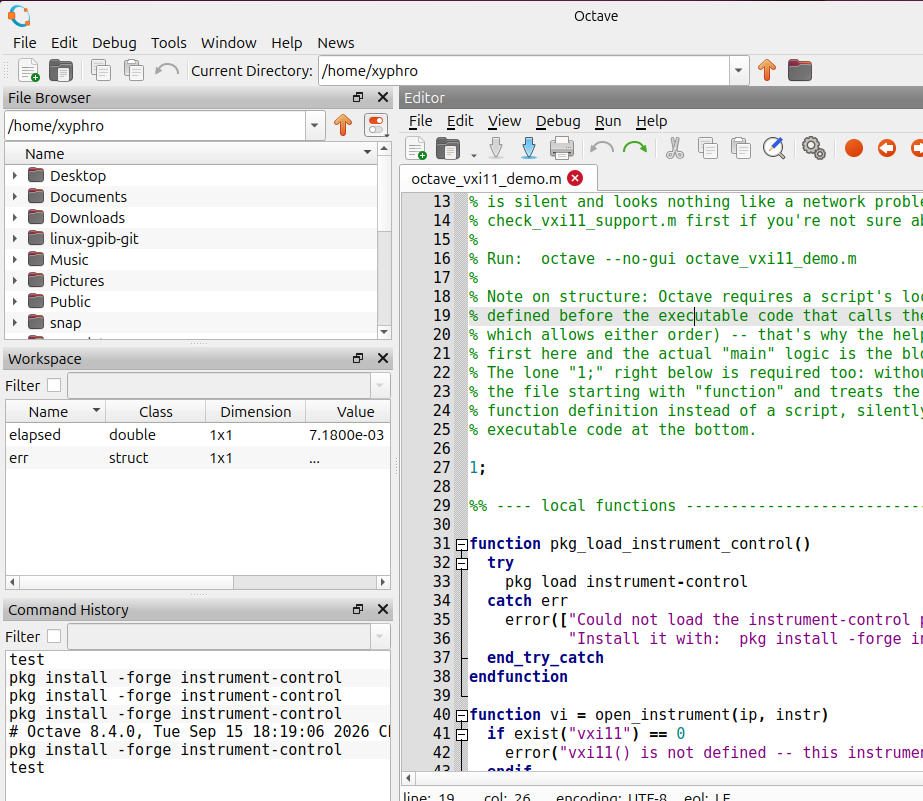
To run it, press F5, or use Run → Save file and run.
Output does not appear in the editor. Click the Command Window tab at the bottom to see it.
What the output shows
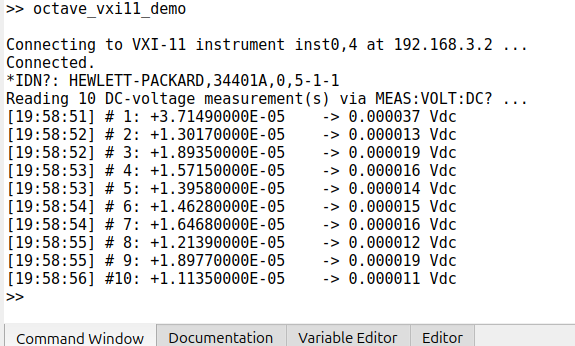
Reading down what happened:
Connecting to VXI-11 instrument inst0,4 at 192.168.3.2 ...thenConnected.The script opened a VXI-11 link to GPIB address 4 behind the adapter at that IP.*IDN?: HEWLETT-PACKARD,34401A,0,5-1-1The instrument identified itself: manufacturer, model, serial number and firmware revision. If this line appears, the whole chain works.- Ten numbered lines, each with a timestamp, the raw reply such as
+3.71490000E-05, and the parsed value0.000037 Vdc.
Keeping the raw reply next to the parsed number is deliberate. When a value looks wrong, the first question is whether the instrument sent something unexpected or the parsing went astray, and with both on the line you can see which.
The readings themselves are a multimeter measuring an open input, so they are tens of microvolts of noise. That is the expected result with nothing connected, and a good sanity check: the numbers move a little between readings, which tells you they are real measurements rather than a cached value.
How the script works
Everything you would normally change sits in one block:
instrument_ip    = "192.168.3.2";  % GPIBee / instrument LAN address
instrument_name  = "inst0,4";      % VXI-11 device name
read_count       = 10;             % number of MEAS:VOLT:DC? readings
io_timeout_s     = 3;              % informational only
instrument_ip is the adapter. 192.168.3.2 is the default address of a GPIBEE connected over USB, which is used here because it is predictable; over Ethernet you put in whatever address it has on your network.
instrument_name is the VXI-11 device name, and inst0,4 means GPIB primary address 4. It is the same thing as the tail of the VISA resource string used in the other tutorials: TCPIP::192.168.3.2::inst0,4::INSTR.
The instrument work itself is four calls:
| Call | What it does |
|---|---|
vi = vxi11(ip, name) | Opens the link and returns a handle. |
vxi11_write(vi, [cmd "\n"]) | Sends a command, with a line feed appended. |
[data, count] = vxi11_read(vi, 4096) | Reads a reply, at most 4096 bytes, as a byte array plus a count. |
vxi11_close(vi) | Closes the link. |
A query is a write followed by a read, which the script wraps in a small helper:
function response = query_instrument(vi, command)
  vxi11_write(vi, [command "\n"]);
  [data, count] = vxi11_read(vi, 4096);
  response = strip_termination(char(reshape(data(1:count), 1, count)));
endfunction
Note what vxi11_read hands back: a numeric byte array and a count, not a string. The char(reshape(...)) turns the first count bytes into text. Forgetting the count and converting the whole 4096-byte buffer is a common first mistake, and it gives you your answer followed by a great deal of rubbish.
The main loop is wrapped in unwind_protect:
unwind_protect
  % ... open, query, read ...
unwind_protect_cleanup
  if !isempty(vi)
    vxi11_close(vi);
  endif
end_unwind_protect
That is Octave's try/finally, and it matters more than it looks. The cleanup block runs whether the script finishes normally, hits an error, or you interrupt it with Ctrl+C, so the link to the instrument is always closed. Without it, an error mid-run leaves a link open on the adapter, and the next run can find the instrument busy.
Octave, not MATLAB
Octave and MATLAB overlap heavily, but this script uses Octave-only syntax in several places. If you want to run it under MATLAB, these are what you would have to change:
| In this script | Why MATLAB will not take it |
|---|---|
endfunction, endif, endwhile, end_try_catch | Octave's explicit block terminators. MATLAB uses plain end for all of them. |
unwind_protect / unwind_protect_cleanup | Octave's try/finally. MATLAB has no direct equivalent; you would restructure with try/catch or onCleanup. |
!isempty(x) | MATLAB wants ~isempty(x). Octave accepts both. |
printf | MATLAB uses fprintf. |
pkg load instrument-control | Octave's package system. MATLAB has toolboxes instead, and would use its own Instrument Control Toolbox with different function names. |
The lone 1; near the top | Octave-specific, and load-bearing. See the note below. |
function is treated by Octave as a function file rather than a script, and the executable code at the bottom is silently skipped. The stray 1; at the top is what stops that happening. And Octave requires a script's local functions to be defined before the code that calls them, which is why the helpers come first and the main logic is at the bottom. MATLAB allows either order, so this is one of the places where code that looks portable is not.
Termination and timeout
The script appends a line feed to every command it sends, in query_instrument, and strips any trailing CR or LF from what comes back, in strip_termination. That suits nearly every SCPI instrument, including the 34401A. If yours needs a carriage return instead, change the "\n" in the write; the stripping side already handles CR, LF and CRLF.
io_timeout_s in the configuration block is informational only. This version of instrument-control has no call to set a timeout on a vxi11 object, so the value is not applied anywhere. The read blocks according to the VXI-11 server's own timeout handling instead. The variable is there to document the intent, not to control it, and changing it has no effect.
Troubleshooting
| Problem | Solution |
|---|---|
| "could not load the instrument-control package" | The package is not installed. Run pkg install -forge instrument-control at the Octave prompt. |
pkg install fails with a compiler or mkoctfile error |
octave-dev is missing. Install the full apt line above, then try again. |
| "vxi11() is not defined" or "doesn't support the VXI11 interface" | The package was built without VXI-11 support, almost certainly because libtirpc-dev and rpcsvc-proto were not present when it compiled. Install them, then rebuild the package with pkg install -forge instrument-control again. This failure does not look like a missing library; it looks like a network problem, which is why it is worth checking early. |
| The script appears to do nothing when run | Output goes to the Command Window, not the editor. Click that tab. |
| Connecting hangs, or fails | The GPIBEE is not reachable at that IP, or nothing answers at that GPIB address. Confirm the address in a browser, then use the GPIB scan in the web interface to see which addresses are occupied. |
| The reply has rubbish after the real answer | You are converting the whole read buffer rather than the first count bytes. See query_instrument for the correct form. |
| A rerun says the instrument is busy | A previous run left a link open. unwind_protect prevents this in the example; if you removed it, restore it. |