Overview
Most of the examples on this site drive instruments from Python. This one is for the other case: a C program on Windows that opens an instrument through GPIBEE, sends SCPI commands and reads the answers back. No Python, no runtime to ship, just an .exe.
You do not have to write it from scratch. A complete Code::Blocks project is ready to download below. It builds out of the box, queries *IDN? and prints the reply. From there you change one line to point at your own instrument and start adding commands.
The example talks to the instrument through a small helper layer called XyGPIB, which comes with it. That is example code rather than a library you have to adopt: it exists so a first program does not have to meet the full VISA API head-on. Calling VISA directly works just as well, and the section near the end explains the trade.
By the end of this page you will have a working C program talking to an instrument, and you will know the handful of functions needed to write your own.
Why Code::Blocks
Code::Blocks is a small, self-contained C and C++ IDE that runs on Windows, Linux and macOS. It has been around a long time, it is free and open source, and it does not want to be anything more than an IDE: no account, no telemetry, no plugin marketplace to work through before you can compile something.
What makes it a good fit for a tutorial like this one is the Windows installer that bundles its own compiler. On most other toolchains, "install the IDE" and "install a working C compiler" are two separate projects, and the second one is where people give up. Here they are one download.
It is also genuinely light. The whole thing installs in under a minute, starts instantly, and runs comfortably on a laptop that would struggle with a modern IDE. If your normal environment is Visual Studio or VS Code, the sources in the project are plain C11 and will build there just as well. Code::Blocks is the path of least resistance, not a requirement.
Prerequisites
- A GPIBEE on the network, with an instrument on the GPIB bus.
- Windows. The example project targets 64-bit Windows.
- A VISA implementation installed on the PC. See the next section.
- Code::Blocks with a C compiler. See further below if you do not have it.
Install a VISA
VISA is the standard API that sits between your program and the instrument. Your code says "open this resource, write this string, read the answer", and VISA takes care of the transport underneath, whether that is LAN, USB or a GPIB card. GPIBEE presents itself as a VXI-11 instrument on the network, so any VISA can talk to it.
VISA is not part of Windows, and it is not bundled with Code::Blocks. You have to install one, and the example needs it only to run, not to build.
NI-VISA and the Keysight IO Libraries Suite work equally well. If one of them is already on the machine, use it and skip ahead.
Install Code::Blocks
Skip this if you already have Code::Blocks with a working compiler. Otherwise, download it from the official binaries page:
The page offers several files, and the choice matters. Take codeblocks-25.03mingw-setup.exe from the "Microsoft Windows (64 bit, default)" section:
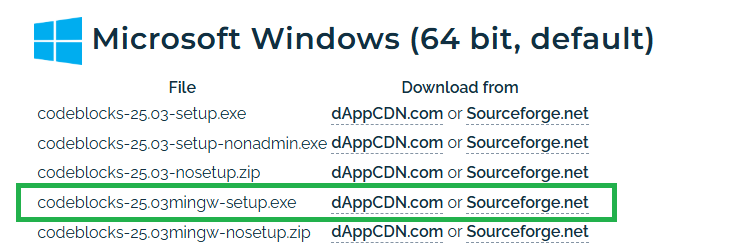
The mingw in the name is the important part: this build ships with the GCC compiler and the GDB debugger included, taken from the WinLibs project. Install it and you are done. There is nothing else to fetch, no toolchain to configure, no environment variable to set. Code::Blocks finds the bundled compiler on first start and selects it automatically.
The plain codeblocks-25.03-setup.exe gives you the editor with no compiler behind it. It is the right choice if you already run your own toolchain, and a frustrating one if you do not.
Download the example
Complete Code::Blocks project in plain C. Builds with no VISA SDK, headers or import library installed.
Unpack it somewhere convenient. Inside you will find:
| File | What it is |
|---|---|
main.c | The example program. Loads VISA, opens the instrument, queries *IDN?, prints the answer, closes. This is the file you edit. |
XyGPIB.h / .c | The helper API described on this page. The only header your own code needs to include. |
visa_interface.h / .c | The VISA runtime loader underneath XyGPIB. Used internally only. You should not need to open it. |
CodeBlocksGpibeeExample.cbp | The Code::Blocks project, with Debug and Release targets. |
README.md | The same ground as this page, plus notes on how the code was verified. |
visa_interface.h declares the few VISA types it uses itself instead of including the IVI Foundation headers, and the VISA DLL is loaded at run time rather than linked. So the project compiles on a machine with no VISA installed at all. VISA only becomes a requirement when you run the program.
Finding your way around Code::Blocks
Skip this section if you have used an IDE before. If you have not, it is four things.
Open the project, not the source file
The file to open is CodeBlocksGpibeeExample.cbp. The .cbp extension means Code::Blocks Project, and it is the file that ties the five sources together and carries the compiler settings. Double-click it, or use File → Open inside Code::Blocks.
Opening main.c on its own also works, but then Code::Blocks has a lone file rather than a project, and the Build commands have nothing to build. If the title bar does not say [CodeBlocksGpibeeExample], that is what happened.
The Management panel on the left
Once the project is open, the Management panel lists everything in it, split into Sources and Headers. Double-click any entry to open it in the editor. main.c is the one you want.
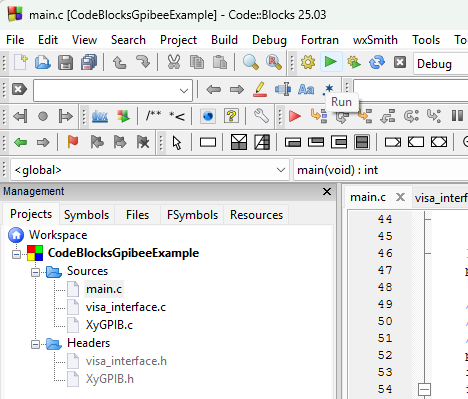
The Run button
The green arrow in the toolbar, marked Run in the screenshot above, starts the program that was last built. It opens a console window, runs the executable and holds the window open at the end so you can read the output before it disappears.
Run on its own does not compile anything. If you have just edited main.c, it will happily run the previous build and leave you wondering why your change did nothing. Use Build and run instead, which is the next item along.
The Build menu
Everything to do with compiling lives under Build:
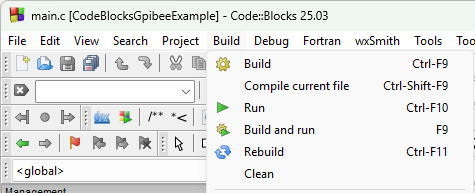
| Command | Shortcut | When to use it |
|---|---|---|
| Build and run | F9 | Compiles anything that changed, then runs it. This is the normal one. |
| Build | Ctrl-F9 | Compile only, without running. Useful for checking that an edit compiles. |
| Run | Ctrl-F10 | Runs the last build without compiling. |
| Rebuild | Ctrl-F11 | Throws away all previous output and builds everything from scratch. Reach for it when the build behaves oddly after changing settings. |
| Clean | – | Deletes the build output and stops. The next build then starts fresh. |
| Compile current file | Ctrl-Shift-F9 | Compiles just the open file. Handy in a large project, unnecessary in this one. |
Results appear in the Build log at the bottom of the window. Warnings are normal and are printed in the log; the line that matters is the final one, which reports the number of errors and warnings.
Set your instrument address
Open main.c. Near the top there is one line you have to change:
/* Adjust to the instrument on your network. */
#define INSTR_RESOURCE   "TCPIP::192.168.3.2::inst0,4::INSTR"
That string is a VISA resource name. Read from the left it says: reach the device over TCP/IP, at address 192.168.3.2, and talk to GPIB address 4 behind it. The 192.168.3.2 is the GPIBEE itself, and the 4 is the instrument sitting on the GPIB bus. Both parts will almost certainly differ on your bench.
You do not have to construct that string by hand. The R&S VISA Tester, installed alongside R&S VISA, will find it for you: it searches the network, lists what it finds, and hands you the exact resource name to paste. The Installing & Using a VISA tutorial covers that search step by step, including the GPIB scan that shows which addresses are occupied.
The timeout on the next line is in milliseconds and applies to every read and write on the session. Three seconds suits most instruments. Raise it if you are triggering long measurements, since a sweep that takes ten seconds to complete needs a timeout longer than the sweep.
#define IO_TIMEOUT_MS 3000
Build and run
Press F9 (Build and run). The project has Debug and Release targets; either is fine to start with.
A console window opens, and a successful run looks like this:
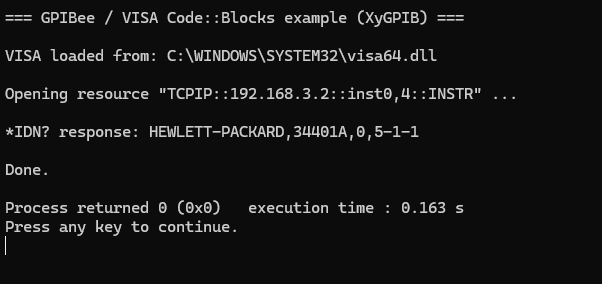
Reading down: VISA was found and loaded, the resource opened, and the instrument replied to *IDN? with its manufacturer, model, serial number and firmware revision. Process returned 0 is Code::Blocks reporting the exit code, and the prompt to press a key is what keeps the window from vanishing before you can read it.
If you get that far, the whole chain is working: your compiler, VISA, the network, the GPIBEE, the GPIB bus and the instrument. Everything after this is just sending different commands.
When it does not work
If the GPIBEE cannot be reached, or there is no instrument at the GPIB address you asked for, the open fails and you see this instead:
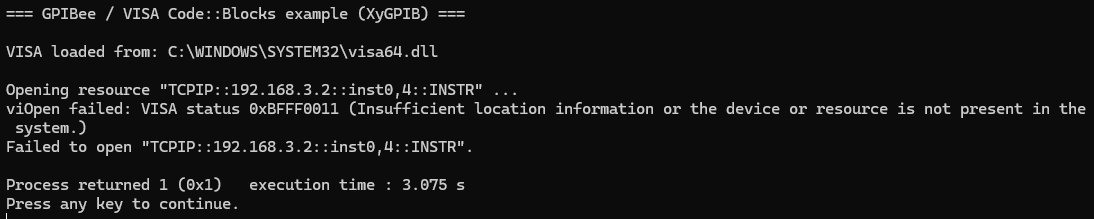
Two lines are worth reading carefully:
viOpen failed: VISA status 0xBFFF0011 (Insufficient location information or the device or resource is not present in the system.)comes fromXyGPIB_SetDebug(true). That is VISA's own wording, decoded for you. Without debug output switched on you would only get the line below it.Failed to open "TCPIP::192.168.3.2::inst0,4::INSTR"is the example's own message, printed becauseXyGPIB_Open()returnedNULL.
Despite its wording, 0xBFFF0011 nearly always means one of two ordinary things: the GPIBEE is not reachable at that IP address, or it is reachable but nothing answers at that GPIB address. Note the execution time of about three seconds in the screenshot, which is the IO_TIMEOUT_MS value elapsing while VISA waits.
Check them in that order. Open the GPIBEE web interface in a browser to confirm the IP, then use its GPIB scan to see which addresses actually have an instrument on them. A device switched off, set to a different address, or with no GPIB cable seated properly all produce this same error.
When no VISA is installed
The program checks for VISA before it does anything else. If none is installed it says so in plain language and tells you where to get one, rather than dying with a missing-DLL box:
Could not load a working VISA runtime: visa64.dll / visa32.dll not found

No usable VISA implementation was found on this PC.
Please install R&S VISA (free) from Rohde & Schwarz:
  https://www.rohde-schwarz.com/appnote/RSVisa
-m64, so it always produces a 64-bit executable. The compiler bundled with the mingw installer handles both, so this needs no attention from you. It matters because a 32-bit program cannot load a 64-bit visa64.dll, and getting that combination wrong produces a confusing "not found" for a file that is plainly there.
Termination and timeout
Everything about how the session behaves is decided in a single call:
instr = XyGPIB_Open(INSTR_RESOURCE, XyGPIB_TERM_LF, XyGPIB_TERM_LF, IO_TIMEOUT_MS);
The two middle arguments are the write termination and the read termination, in that order, and they are set independently. This matters more than it looks like it should. Termination is how both ends know a message has ended, and it is the single most common reason a first attempt at instrument control hangs until it times out.
Write termination is what gets appended to every string you send. Most SCPI instruments expect a line feed and will sit silently waiting if they do not get one.
Read termination is how the read knows to stop. It is applied to the session itself, so the read returns the moment the terminator arrives rather than waiting out the full timeout. XyGPIB_Read() then strips the trailing CR, LF or CRLF from what it hands back, so you never have to trim the string yourself.
| Value | On write | On read |
|---|---|---|
XyGPIB_TERM_LF | appends \n | stops at \n. The usual choice, and what the example uses. |
XyGPIB_TERM_CR | appends \r | stops at \r. Some older instruments want this. |
XyGPIB_TERM_CRLF | appends \r\n | stops at \n, since VISA matches a single byte and CRLF always ends in LF. |
XyGPIB_TERM_EOI | appends nothing | no terminator byte. The read ends on the EOI signal alone, and nothing is stripped. |
If you do not know what your instrument wants, start with XyGPIB_TERM_LF for both. If reads time out while writes clearly work, the read termination is the first thing to change.
Write, read and query
Three functions cover almost everything you will do with a SCPI instrument. All three return bool: true means it worked.
Write: send a command
Use it for commands that produce no answer. The termination you chose at open time is appended for you, so do not add \n yourself.
XyGPIB_Write(instr, "*RST");                 /* reset the instrument      */
XyGPIB_Write(instr, "CONF:VOLT:DC 10,0.001"); /* 10 V range, 1 mV res.     */
Read: fetch an answer
You pass a buffer and its full size. The result is always NUL-terminated on success, and the trailing CR/LF is already removed, so it is an ordinary C string you can pass straight to printf or atof.
char response[256];

if (XyGPIB_Read(instr, response, sizeof(response))) {
    printf("got: %s\n", response);
}
bufSize - 1 bytes to leave room for the NUL. If the instrument sends more than fits, you get a truncated answer and the rest is still queued for the next read, which then returns a confusing fragment. 256 bytes is plenty for a reading; identification strings and error lists want more.
Query: write then read, in one call
A query is simply a write followed by a read, and it is what you want for anything ending in ?. This is the workhorse.
char response[256];

if (!XyGPIB_Query(instr, "*IDN?", response, sizeof(response))) {
    fprintf(stderr, "*IDN? query failed.\n");
} else {
    printf("instrument: %s\n", response);
}
Putting those together, a complete measurement is short:
char buf[64];
double volts;

XyGPIB_Write(instr, "CONF:VOLT:DC");

if (XyGPIB_Query(instr, "READ?", buf, sizeof(buf))) {
    volts = atof(buf);
    printf("%.6f V\n", volts);
}
When the text functions are the wrong tool
Screenshots, waveform dumps and anything else that is not text will contain zero bytes, and a zero byte ends a C string. For those, use XyGPIB_WriteRaw() and XyGPIB_ReadRaw(), which add nothing, strip nothing and report exactly how many bytes arrived.
unsigned char image[65536];
size_t got;

XyGPIB_Write(instr, "HCOP:DATA?");

if (XyGPIB_ReadRaw(instr, image, sizeof(image), &got)) {
    printf("%zu bytes\n", got);
}
XyGPIB function reference
The complete API. Everything that can fail returns bool, so a raw ViStatus never reaches your code.
| Function | What it does |
|---|---|
| Startup | |
bool XyGPIB_LoadVisa(char *loadedPath, size_t size) |
Loads the system VISA runtime, trying visa64.dll then visa32.dll. Call once before opening anything. Writes the path of the DLL it found into loadedPath. |
const char *XyGPIB_GetVisaLoadErrorDetail(void) |
Why the previous XyGPIB_LoadVisa() failed, in readable text. |
| Open and close | |
XyGPIB_Instr *XyGPIB_Open(const char *resource, XyGPIB_Term writeTerm, XyGPIB_Term readTerm, unsigned long timeoutMs) |
Opens a resource and returns a handle, or NULL on failure. Sets the timeout and both termination modes. |
bool XyGPIB_Close(XyGPIB_Instr *instr) |
Closes the session and frees the handle. Safe to call with NULL. The handle is freed whatever it returns, so never use it again afterwards. |
| Text transfers | |
bool XyGPIB_Write(XyGPIB_Instr *instr, const char *str) |
Sends str with the write termination appended. |
bool XyGPIB_Read(XyGPIB_Instr *instr, char *buf, size_t bufSize) |
Reads a reply into buf, strips the trailing CR/LF, NUL-terminates. Reads at most bufSize - 1 bytes. |
bool XyGPIB_Query(XyGPIB_Instr *instr, const char *cmd, char *buf, size_t bufSize) |
Write then read, in one call. |
| Binary transfers | |
bool XyGPIB_WriteRaw(XyGPIB_Instr *instr, const void *data, size_t length) |
Sends exactly length bytes, unmodified. |
bool XyGPIB_ReadRaw(XyGPIB_Instr *instr, void *buf, size_t maxLength, size_t *actualLength) |
Reads up to maxLength bytes with no stripping and no NUL. actualLength receives the count, and is set to 0 on failure. |
| Diagnostics | |
void XyGPIB_SetDebug(bool enable) |
When on, every VISA error is printed to stderr as it happens, with the status code and its description. Off by default. Turn it on while developing. |
bool XyGPIB_GetDebug(void) |
Whether debug printing is currently on. |
ViStatus XyGPIB_GetLastVisaError(void) |
The VISA status of the most recent call that failed. One remembered value, not a queue, and a later success does not clear it. |
What XyGPIB is, and is not
XyGPIB is example code, not a product. It is a few hundred lines of C that ship inside the project you just downloaded. There is no library to install, no version to track, no release notes and no support commitment behind it. It is yours to read, change, rename, cut down or delete outright.
It is meant to be taken and used. That is the point of it being here: drop XyGPIB.h and XyGPIB.c into your own project and you have GPIBEE talking to an instrument on the first afternoon rather than the third. Loading the VISA runtime, opening and closing sessions cleanly, getting the termination attributes right and turning status codes into something readable are all solved already, and those are exactly the parts that cost a day each when you start from nothing. Treat it as a running start for your own integration, not as a finished component to be admired from a distance.
The other half of its job is keeping a first program readable. VISA is a capable and fairly large API, and meeting it head-on in your first hour means a resource manager session, an instrument session, attribute codes for the timeout and termination, and a ViStatus to decode after every call, all before you can ask an instrument its name. XyGPIB puts a thin layer over that so the example fits on one screen.
Working with VISA directly is a perfectly good choice, and past the basics it is the better one. Everything XyGPIB does, VISA does; XyGPIB simply exposes fewer functions with an easier interface. When you outgrow it, you are not stuck: include a VISA header, or visa_interface.h from the project, and call VISA yourself. The two mix freely in the same program.
While it is useful, it takes three things off your hands:
- No status codes to decode. VISA returns a
ViStatusfrom every call, which you are expected to test against a list of constants. XyGPIB returnsbool, and keeps the underlying status available throughXyGPIB_GetLastVisaError()for the times you want it. - No session or attribute bookkeeping. Opening an instrument through VISA means a resource manager session, an instrument session, and attribute writes for the timeout and termination.
XyGPIB_Open()is one call with four arguments. - No termination handling in your code. Appending terminators on write and trimming them on read is the sort of detail that quietly produces strings with an invisible
\ron the end. It is handled once, in one place.
What is deliberately missing
XyGPIB covers opening a session and moving bytes, and stops there. Several GPIB primitives you may well need are simply not in it:
- Device clear, to reset an instrument's interface and empty its buffers (
viClearin VISA). - Triggering, the Group Execute Trigger that starts a measurement on one or several instruments at once (
viAssertTrigger). - Reading the status byte by serial poll, the usual way to ask an instrument whether it is finished or has an error waiting (
viReadSTB). - Service requests and events, so an instrument can interrupt you rather than being polled.
- Locking, and the full VISA attribute set.
None of these are missing by oversight, and none are waiting on a future version. This is example code: adding them would make it a library, which is not what it is for. VISA offers all of them, and since XyGPIB is a thin layer over VISA you can call them directly alongside it in the same program.
Troubleshooting
| Problem | Solution |
|---|---|
| "Could not load a working VISA runtime" | No VISA is installed, or a 32-bit build is looking for a 64-bit DLL. Install R&S VISA and confirm the Release/Debug target is building 64-bit. |
| Code::Blocks reports no compiler found | You installed the plain setup rather than the mingw one. Either install codeblocks-25.03mingw-setup.exe over it, or point Settings → Compiler → Toolchain executables at a toolchain you already have. |
XyGPIB_Open() fails with 0xBFFF0011 |
The GPIBEE is not reachable at that IP, or no instrument answers at that GPIB address. Confirm the IP in a browser, then use the GPIB scan in the web interface, or the R&S VISA Tester, to see which addresses are occupied. |
| Writes work, reads always time out | Read termination. The instrument is not sending the terminator you configured. Try XyGPIB_TERM_EOI, or the other CR/LF variants. |
| The answer has a stray character at the end | You are in XyGPIB_TERM_EOI mode, which strips nothing by design. Switch to CR, LF or CRLF, or trim it yourself. |
| Long measurements fail but short ones work | The timeout is shorter than the measurement. Raise IO_TIMEOUT_MS past the longest operation you trigger. |
| Answers arrive one command late | A previous read left data queued, usually after a truncated read. Enlarge the buffer, and make sure every query is read exactly once. |
XyGPIB_SetDebug(true) is already in the example's main(). It prints the VISA status and its description for every failure, which usually names the problem outright and saves a round of guessing.