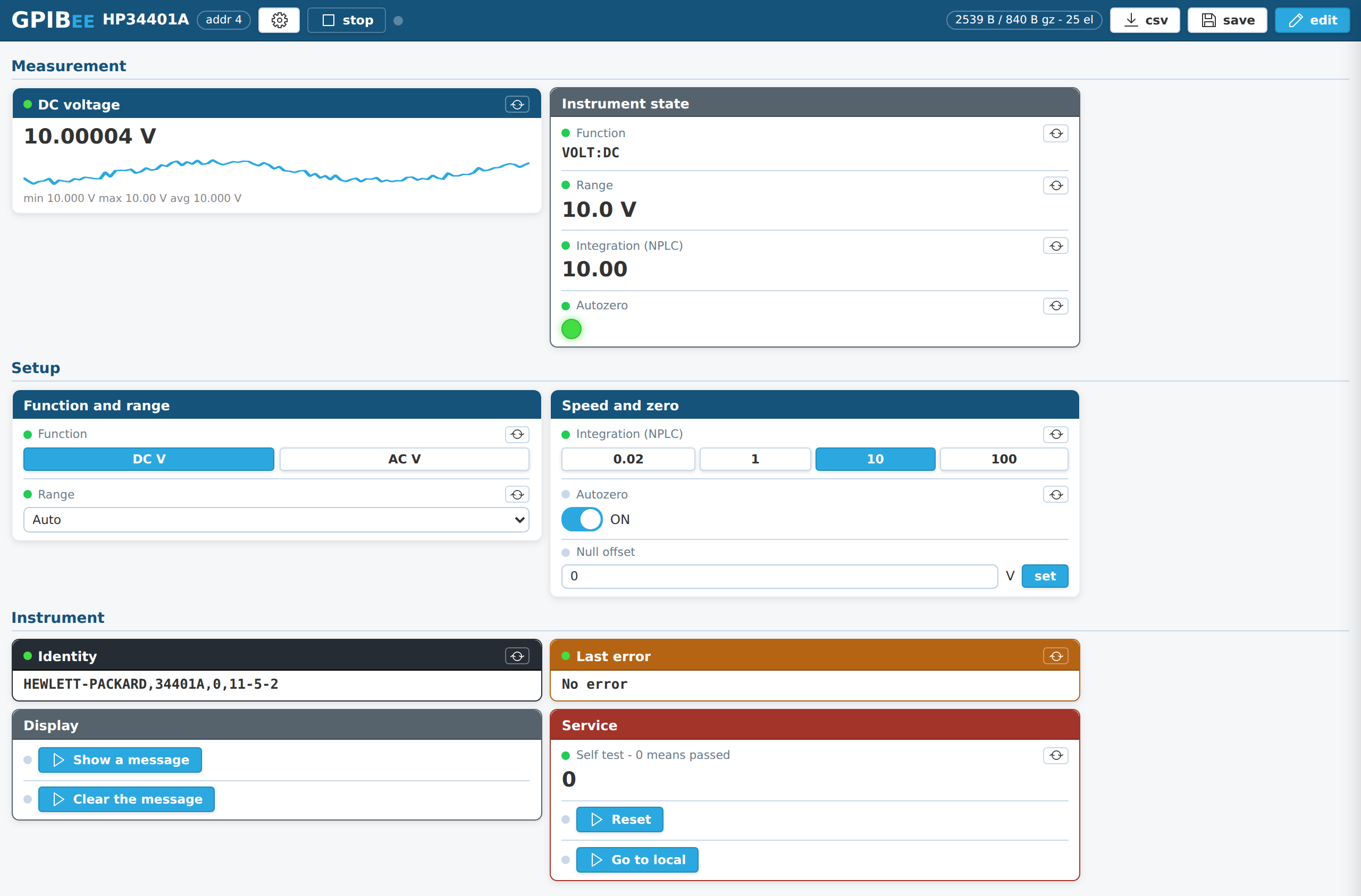
Every instrument on your bench now has a web interface. Even the ones built in 1985. That is what GPIBEE firmware V1.6 adds, and it is the feature I have most wanted to build since the project started.
It is called Benches. You open the web interface, click together a page of readouts, switches, buttons and entry fields, say which GPIB command sits behind each one, and press run. That is it. The definition is stored on the GPIBEE itself, so it is there from any browser on the network, on any machine, with nothing installed. Your laptop, your phone, the tablet on the shelf, a colleague's PC.
No Python. No VISA runtime. No driver hunting. No hunting for the one machine that still has the right software installed on it. Just a browser and the instrument you already own.
Here is what that looks like on a real bench:
Turn the power supply on from the kitchen table office table
Here is the case that started this. You have a bench supply with a GPIB port and no network interface, because in 1992 nobody was putting Ethernet on a power supply. It is powering something in the lab. You are at home.
A lot of us learned that particular lesson the hard way during Covid, when the lab was suddenly on the other side of a lockdown and half an experiment was reachable only by asking a colleague to walk over and press a button. What surprised me afterwards is that the habit stuck. Being able to reach an instrument without standing in front of it turns out to be just as useful at work: the supply stays in the rack where it belongs, the noisy equipment stays behind a door, and you keep working from wherever you happen to be sitting.
With a bench, that supply now has an output switch you can reach from anywhere you can reach the network:
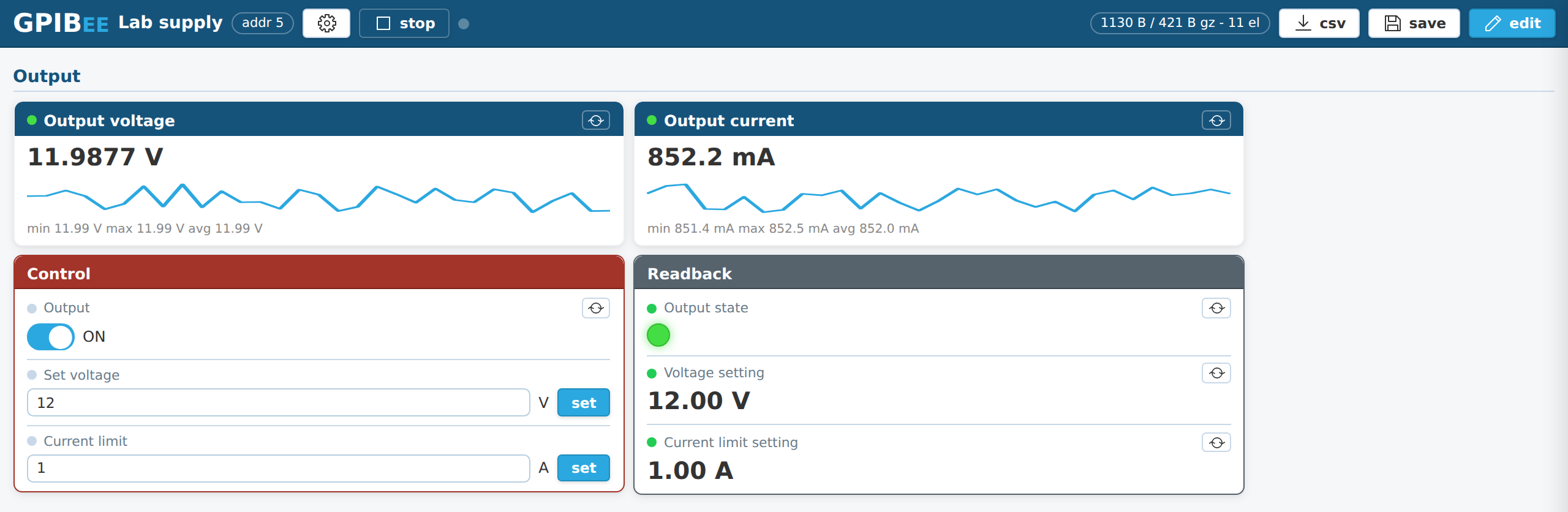
Flip the switch, watch the current come up, set a different voltage, watch it follow. Cards can be coloured, so the controls that change the world get to look like it.
Read the meter from the home office or coffee corner
The layout collapses to a single column on a phone, all by itself. Your multimeter becomes something you glance at from the coffee corner, that well known venue for the most fruitful engineering discussions of the day:
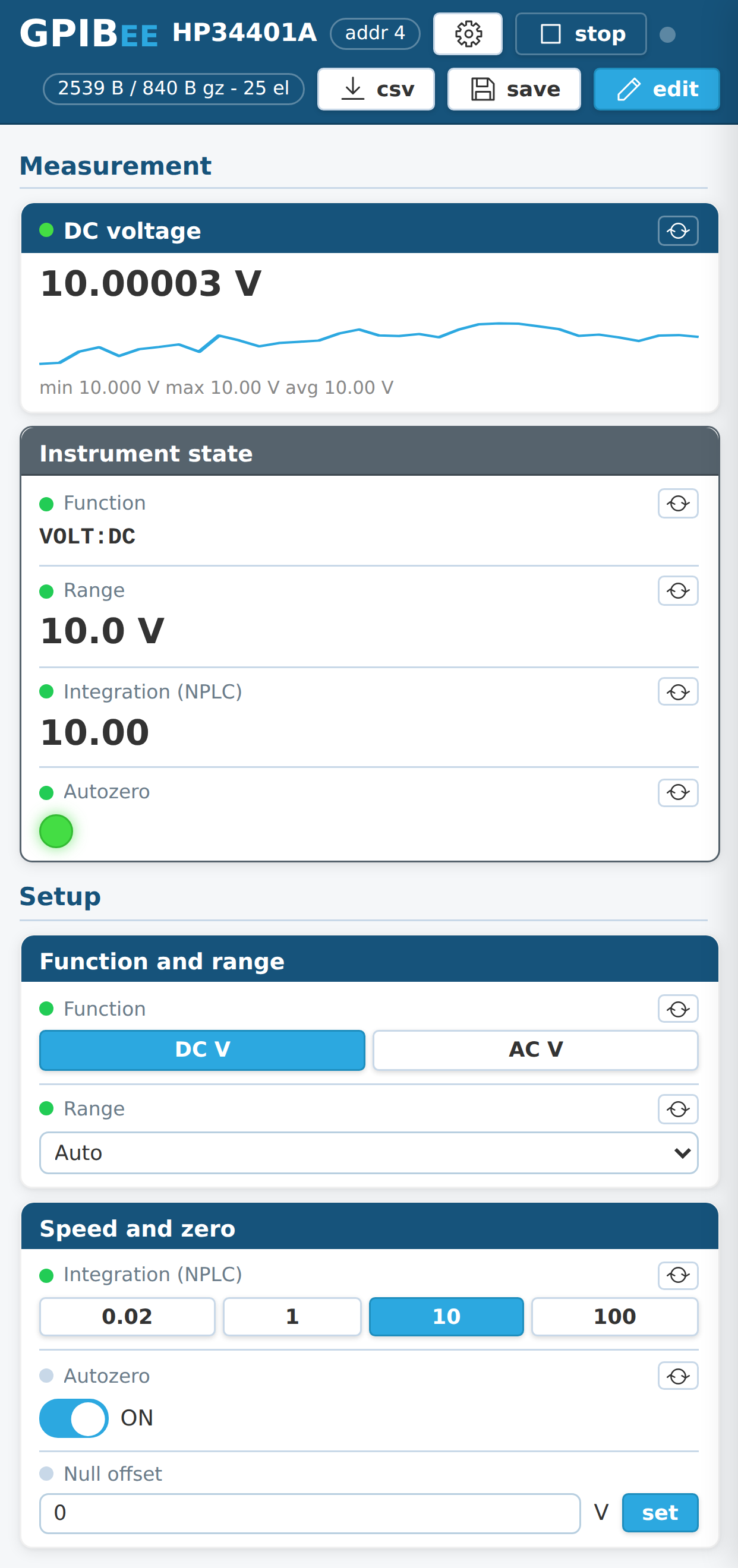
One practical condition for this one: your phone and the GPIBEE have to be on the same network, so the adapter needs to sit on the wired network that your wifi also reaches. In plenty of labs and home labs that is simply how it is already wired, and then there is nothing to do. In others the bench network is deliberately separate from the wifi, and that is a question for whoever runs it rather than something the adapter can decide. On a laptop the point is moot, since it is on the same network as the instrument anyway.
The main reading keeps a rolling trend line with minimum, maximum and average underneath, which turns out to be startlingly useful. Leave a reference warming up over lunch and the shape of its drift is simply there when you come back. Everything read while a bench is running is also kept for a CSV download: one column per reading, one row per tick, one button.
Retrofit a web interface onto instruments that never had one
This is where it gets genuinely fun. Older instruments are magnificent and many of them will outlive us, but a 1985 counter has no web page, no API, no app, and no prospect of ever getting one. A bench gives it all three of the things you actually wanted:
- a readout you can see from another room,
- the two or three controls you actually use, as real buttons and switches,
- and a link you can send to a colleague.
One GPIBEE holds a front panel for every instrument on the bus, and you switch between them from a dropdown:
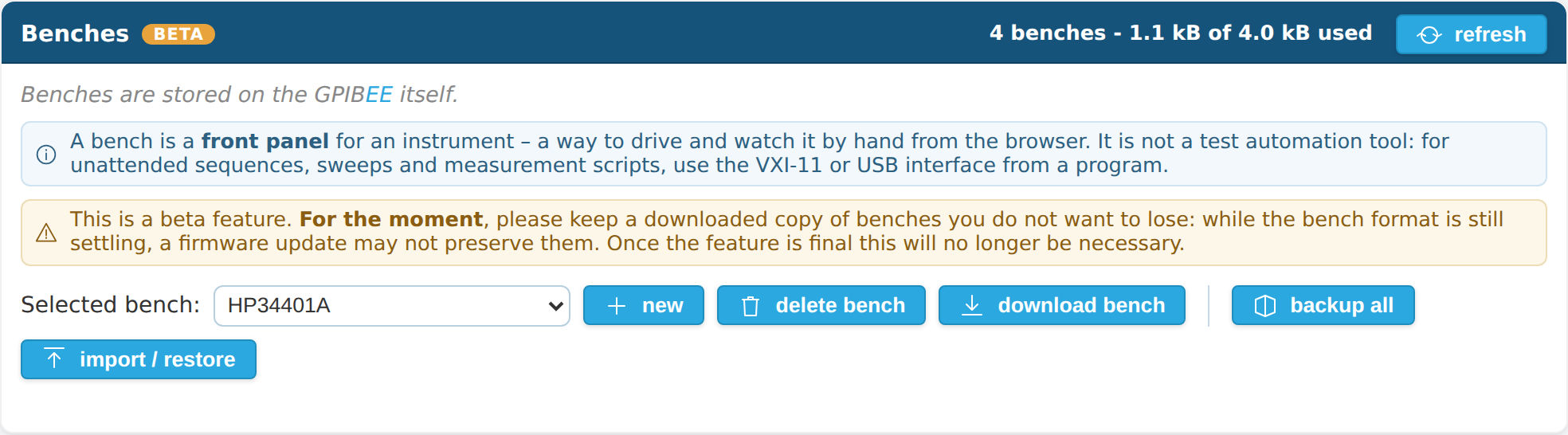
Benches travel, too. Download one as a small .gpibee file and send it to
somebody with the same instrument, who imports it and has a working front panel in
about ten seconds. I fully expect people to start trading these, and I would love to
see it.
There is already a small pile of them to start from, because writing benches is how this feature got tested properly. A 34401A and a 3457A for the two multimeters, a Keithley 199 that also drives its scanner option, an HP 3325A generator with a second bench for its sweep mode, a CMU200 in spectrum analyzer mode, and one that is tied to no model at all and simply exercises the 13 mandatory IEEE 488.2 commands. Building each of those turned up something worth fixing, which is rather the point. They are all on the Benches page, ready to download and import:
You are not writing software. You are filling in fields.
Every element is a label, a style, a width, and the command sequence behind it. Here is the entire configuration of that big live voltage reading:
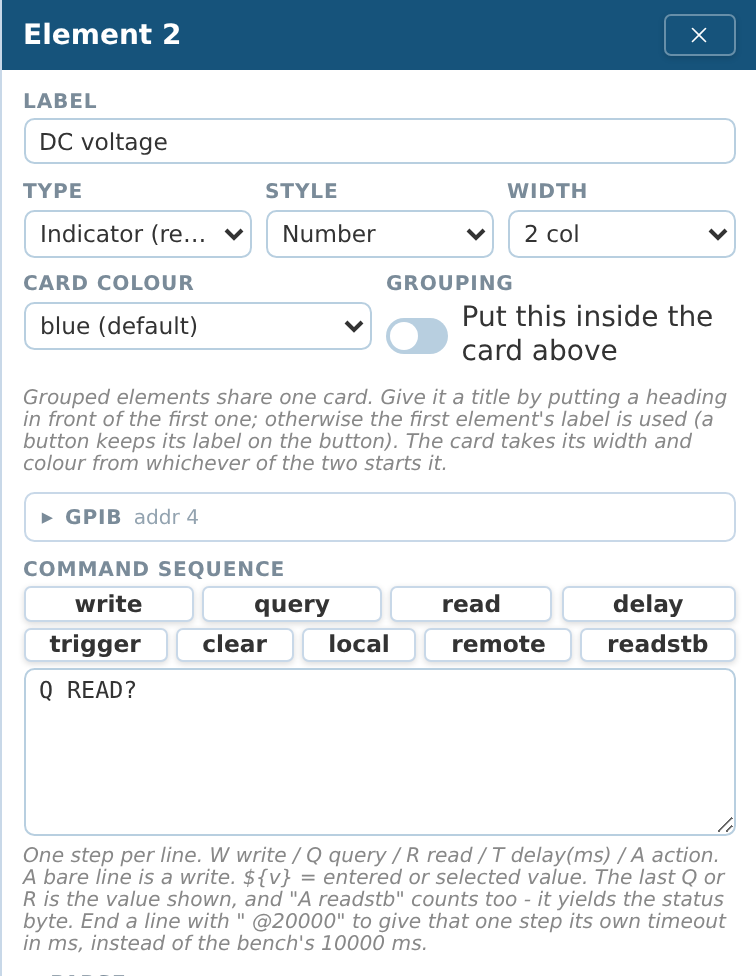
Q READ?. Send it, read the answer, show the answer. Further down the same panel, a test button shows you the raw reply, its bytes in hex, and the value the card will display.A test button is the thing that makes this workable on old instruments. If a command is wrong you find out in one click, with the actual bytes in front of you, instead of staring at a blank card wondering why.
And the parsing is built for the real world, not for the datasheet world. A counter
that answers FA+001.01901942E+06? Take the last number and the letters
disappear. An instrument that answers 1.234 MHz? It applies the unit prefix
for you. No SCPI at all, just terse function codes like the HP 3478A? Write the
codes, read the reply, done. Instruments that never assert EOI, need
\n termination, answer with quotes around everything. All of that
was considered while building this, because that is what my own bus looks like.
It downloads files, too
A button can do more than send a command. Switch it to download file to
disk and whatever the instrument sends back lands in your browser's download
folder: a scope screenshot, a captured waveform, a
saved instrument setup, an internal data log. Both common block formats are handled,
including the counted #-block that instruments use when they never assert
EOI, and the filename can carry the date and time so repeated grabs never overwrite each
other.
Screenshot of a scope trace, straight into your documentation folder, from a browser button you made yourself. On an instrument older than the web.
What else will people do with it?
Honestly, I expect to be surprised. But the ones I can already see:
- Burn-in and warm-up watching. Leave a bench running on a reference or an oven and check the trend from wherever you are.
- A shared lab instrument. Send the URL round the team instead of the instrument.
- Teaching and demos. Put the three controls that matter on screen and nothing else, with no menu diving on a 1990s front panel with twelve soft keys.
- Instruments in awkward places. In a rack, in a screened room, in a climate chamber, behind a wall of cables. The instrument stays there; you don't.
- The panel your instrument should have had. Group only the functions you use, name them in your own words, and never hunt through the original menu tree again.
- A one-off setup that would not have been worth a script. This is the big one. Plenty of small jobs never got automated because writing the program cost more than doing it by hand. That threshold just moved a long way down.
And I would genuinely like to hear yours. If you build a bench for
an instrument nobody else has thought of, find a use I have not listed, or run into
something the format cannot express yet, please tell me. Ideas from the people actually
using this shape it far more than anything I come up with alone, and a bench you are
willing to share as a .gpibee file may save somebody else an afternoon.
Feedback, requests and finished benches are all welcome through the
contact and support page.
What it is, and what it is not
A bench is a front panel, not a test program. It is built for driving an instrument by hand and watching what it does. For unattended sequences, sweeps, timing-critical work, or anything you want in version control, use VXI-11 or USB from a real program. See the PyVISA tutorial. The two work side by side, and a bench is often the fastest way to work out which commands your script should send.
Also in V1.6
Benches is the headline, but it is not the only thing in this release. The release notes that ship with the firmware carry the full list; three of them are worth calling out here.
Connections: see who is talking to your instruments
The web interface has a new Connections page showing every active VXI-11 and "++" session on the device, live:
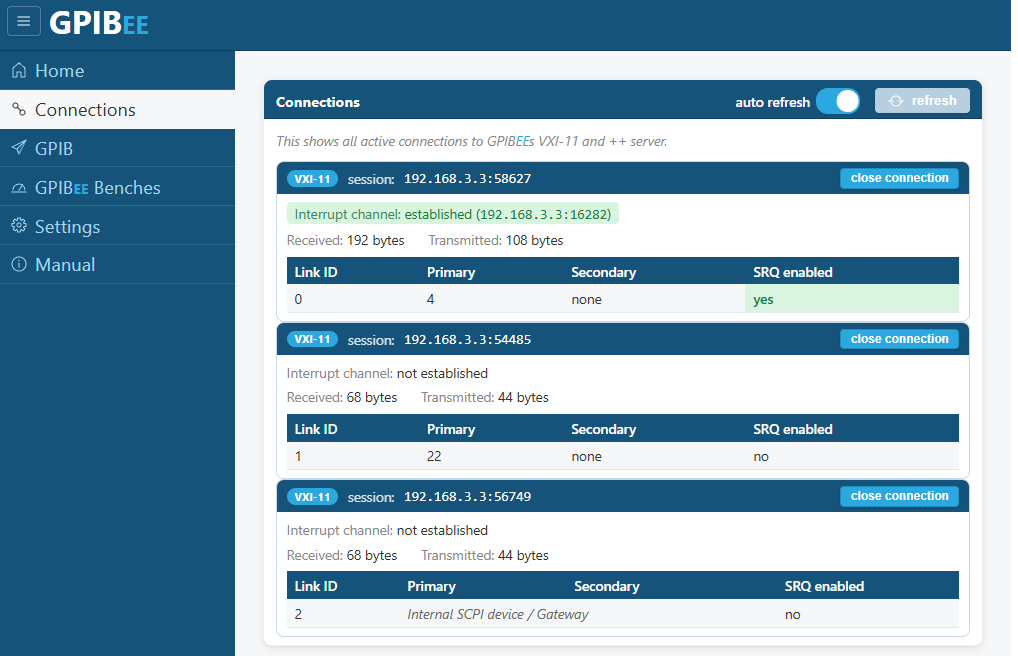
Each session shows the client that opened it, whether its interrupt channel is established and where to, how many bytes have gone each way, and every link it holds with that link's primary and secondary address and whether SRQ is enabled on it. Each one also has a close connection button, which is the part I reach for most: a client that exited badly and left its link open no longer means power cycling the adapter to get the bus back.
It is also the fastest way to answer "is my program actually connected, and did it enable what it thinks it enabled", which used to be guesswork from the instrument side.
Much longer reads in the GPIB panel
The GPIB page's communication panel used to read at most
64 bytes in one go, which is fine for an *IDN? and useless
for anything that answers with real data. It now reads up to
65535 bytes. Waveform blocks, long status strings and instruments that
answer in paragraphs no longer arrive truncated.
To be clear about what that number is: it is a limit on the hand-typed console in the web interface, not on the instrument and not on the adapter. Benches are unaffected, and so is everything that talks to GPIBEE from a program: over USBTMC, VXI-11 or the "++" protocol there is no transfer limit at all.
Parallel poll
GPIBEE can now enable, disable and
execute parallel polls. It is exposed two ways: as a vendor-defined
VXI-11 doCommand, and as an internal SCPI command, which is a good deal
easier to reach for when you just want to try it.
On the Linux GPIB interface the feature is enabled on the GPIBEE side already. Exposing it through linux-gpib itself means contributing it upstream, and that will take a while, so treat that half as coming rather than shipped.
Get it
Benches ships in firmware V1.6, build 2608290003, which is available now on the firmware page together with its release notes. Update your GPIBEE, open the web interface, and look for GPIBEE Benches in the sidebar. There is a full step-by-step walkthrough with an HP 34401A here:
Get firmware V1.6 Benches tutorial →
Fifteen minutes from an empty page to the front panel at the top of this article. Then look at the other instruments on your bench and ask which of them you have been walking across the room to poke.