A bench is a browser front panel for one instrument, clicked together in the GPIBEE web interface and stored on the adapter itself. No software to install, no code to write. This page shows what they look like and gives you a few ready-made ones to import.
Before you start
Benches arrived in firmware V1.6. If your
GPIBEE is on an older build, update it from the
Firmware Updates page first. The
Benches tutorial walks through
building one from an empty page with an HP 34401A as the example, and the
announcement article covers what the
feature is for.
A bench is a front panel, not a test program.It is built for
driving an instrument by hand and watching what it does. For unattended sequences, sweeps
and timing-critical work, use VXI-11 or USB from a real program. See the
PyVISA tutorial.
Examples
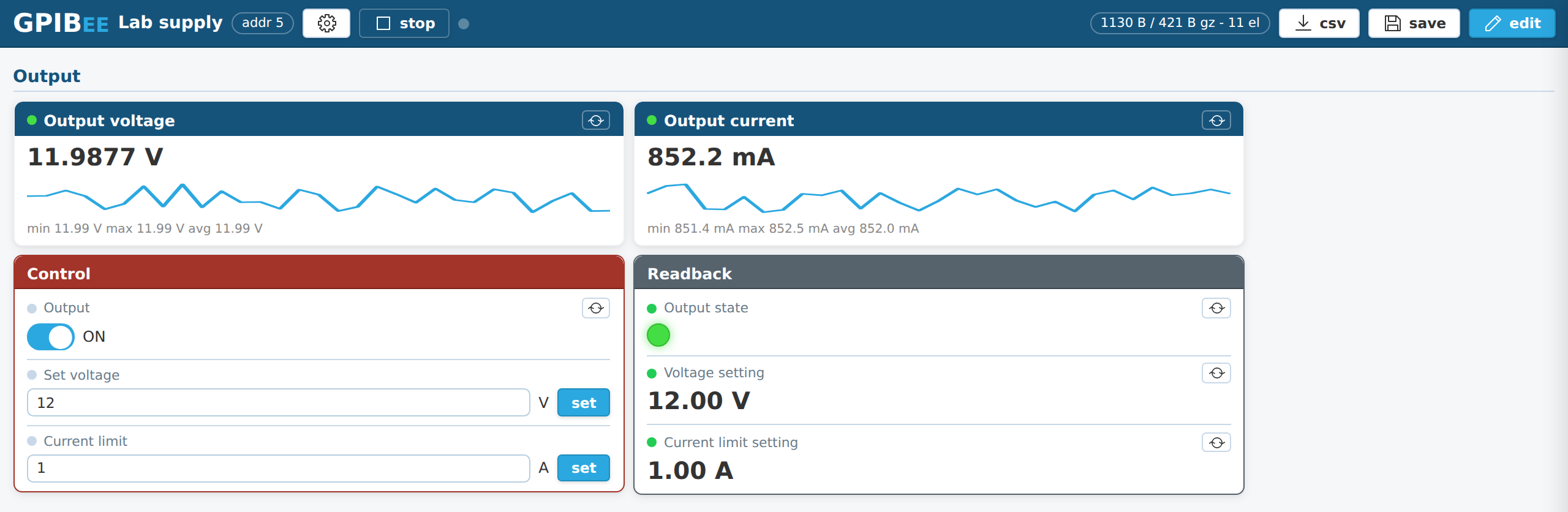
What a bench looks like
Click the screenshot to enlarge it.
A laboratory supply. Output on and off, voltage and current
setpoints, and live readback of what the supply is actually delivering. Cards can be
coloured, so the controls that change the world get to look like it.
Downloads
Ready-made and example benches
Import any of these into your own
GPIBEE and you have a working front panel in about
ten seconds.
Instrument not listed? A shortcut for the lazy:benches are meant to be clicked together by hand, and the tutorial walks you through it in about fifteen minutes. If you would rather not start from an empty page, paste the bench prompt into an AI assistant and add one line naming your instrument and its GPIB address. What comes back is a first draft, usually a decent one: capable models do this well, weaker ones less so. Treat it as a starting point, check the commands against the manual, and test each element before you trust a reading.
How to import one
Download the .gpibee file above.
Open the GPIBEE web interface and go to
Benches in the sidebar.
Press import / restore and pick the file. The bench appears in the
selector.
Open edit and set the GPIB address to the address your
instrument actually uses. That is the one setting these files cannot get right for you.
Keep a copy.Benches are stored on the adapter. While the format is
still settling, keep a downloaded copy of any bench you would not want to lose, and use
backup all on the Benches page before a firmware update.
Curious about the file format?A bench is a JSON document,
optionally gzip compressed. The files on this page are the compressed kind, so unpack one
with gzip and the whole definition is readable in any text editor. Do not build anything on
top of it yet: while Benches is in beta the format can still change, so treat what you see
inside as a snapshot rather than a specification.
Built one worth sharing?Send it in through the
contact and support page
and it can go on this page for everybody else with that instrument.
 GPIBEE Benches