
Since GPIBee came out, one question has kept coming back: "I have a program that
was written for a GPIB card. Can I use it with GPIBee?" Often that program is only
an .exe, the source code is long gone, and the person who wrote it
retired years ago. Until today the honest answer was "only if you rewrite it".
Now the answer is yes. Getting there took several months of work, and today
GPIBee488 V0.9.10 is out as the first public release. GPIBee488 is a
gpib-32.dll for GPIBEE.
It has the same function names, arguments, status bits and error codes as the classic
IEEE 488.2 library that ships with GPIB cards. Your program calls ibdev,
ibwrt and ibrd as before. The library turns each call into
VXI-11 requests and sends them to the adapter over Ethernet or USB networking.
Setup takes about a minute. Copy the DLL into the folder of your program, start it, and that's it. There is no installer, no kernel driver and no VISA to install. Only the program next to the DLL is affected, so an existing GPIB card installation on the same PC keeps working.
A few details that matter in practice:
- Windows 7 and newer, with a real 64-bit
gpib-32.dllnext to the 32-bit one. - Up to eight adapters at once, as
GPIB0toGPIB7, found automatically or assigned by IP address or host name. ibstopcancels a running transfer right away, even a read that is stuck waiting for an instrument.- If the adapter can't do something, the call fails with
ECAPinstead of being silently ignored. The manual lists every one of these cases.
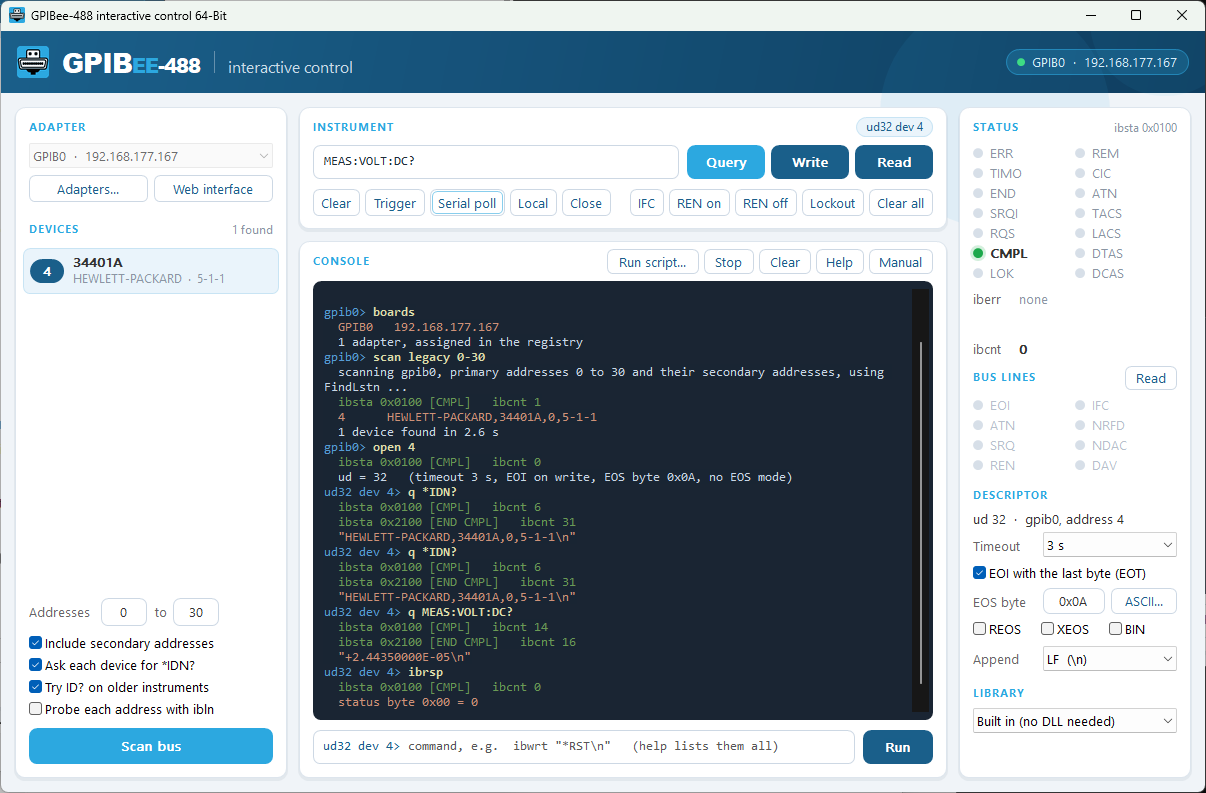
The download also contains the GPIBee-488 interactive control, a small tool to scan the bus and send commands by hand, plus the C/C++ header and a manual with examples in C, C++, Python and C#.
The version number starts with 0.9 for a reason: I want to hear how it works with your software before calling it 1.0. If a program misbehaves, switch on the trace log (section 11.1 of the manual) and send it to support. Old lab software is wonderfully creative in how it uses the 488.2 interface, and every log helps.