Overview
A lot of test setups reach their instruments through a LAN to GPIB gateway that Keysight IO Libraries knows as a remote GPIB interface. The software in those setups addresses instruments as GPIB0::7::INSTR and never has to think about the network in between.
GPIBEE can take the gateway's place in that arrangement.
It fits because of VXI-11. GPIBEE implements the full VXI-11 command set, including the low-level bus commands the standard calls doCommands, which not every implementation supports. It is tested against the VISA libraries from NI, Keysight and R&S. Keysight Connection Expert therefore treats it like any other VXI-11 GPIB gateway: it scans the bus, lists the instruments it finds by make and model, and gives each one an ordinary GPIB resource string.
For the same multimeter, the two forms look like this:
Both reach the same instrument. The first one is what a program written for a GPIB card or a LAN gateway expects, and that is what this tutorial sets up.
Before you start
You need Keysight IO Libraries Suite installed on the PC. Connection Expert comes with it. GPIBEE needs an IP address the PC can reach, which it has both over Ethernet and in USB network mode. The examples below use 192.168.3.2.
Adding the interface
-
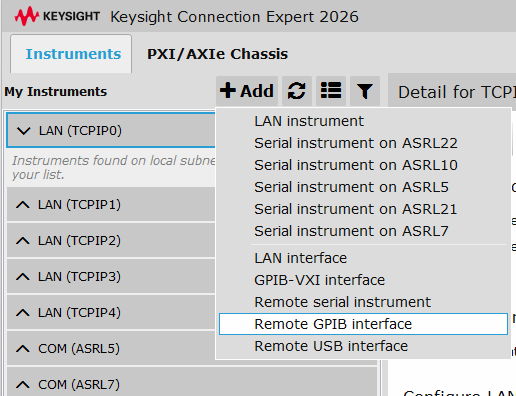
In Connection Expert, click Add and choose Remote GPIB interface.
-
Enter the hostname or IP address of GPIBEE, here
192.168.3.2. Leave SICL Interface Name on Remote Host atgpib0. It reaches the adapter's GPIB bus, and it is also the name the support FAQ recommends whenever Keysight IO Libraries is involved.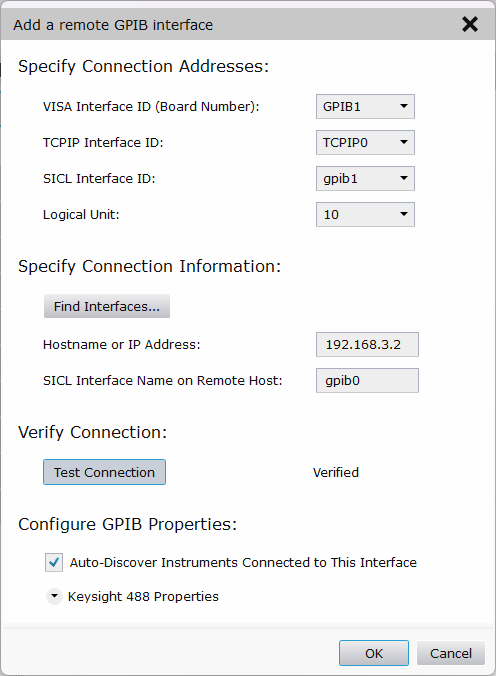
VISA Interface ID (Board Number) is the board number your software will see,
GPIB1in this example. If you are replacing an existing gateway, give GPIBEE the number the old one had and every resource string in your programs stays exactly as it was. - Click Test Connection. When it reads Verified, Connection Expert has reached the adapter.
- Leave Auto-Discover Instruments Connected to This Interface switched on. To find instruments, Connection Expert sends a sequence of VXI-11 doCommands that walk the GPIB bus. GPIBEE supports all of them, so the scan finds every instrument that answers.
- Click OK.
Instruments found automatically
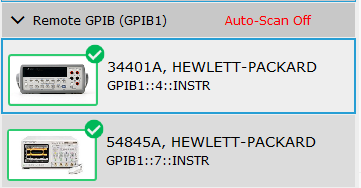
Connection Expert scans the bus and lists what it finds. On this bench that is an HP 34401A multimeter at address 4 and an HP 54845A oscilloscope at address 7, each identified by make and model without anyone typing an address in by hand.
Native GPIB resource strings
Select an instrument and its connection strings show what software will use: GPIB1::4::INSTR as the VISA address and gpib1,4 as the SICL address. They are the same kind of names a GPIB card inside the PC would produce, and nothing in them refers to the network.
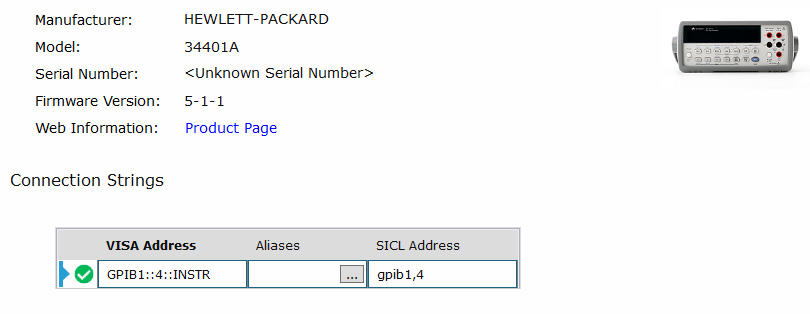
A program written for GPIB1::4::INSTR, or a SICL program written for gpib1,4, therefore runs against GPIBEE without being edited or rebuilt.
Alias names work too. The Aliases column next to each resource string lets you name an instrument, say DMM, and open it by that name instead of its address. That is a feature of the VISA library rather than of the adapter, but it behaves here exactly as it does with any other GPIB interface, so programs that already use aliases need no change either.
Why this is useful
- Existing software keeps its resource names. Match the board number and nothing in the code changes, whether it was written for a GPIB card or for a LAN to GPIB gateway.
- VISA and SICL programs can both use the adapter, through Keysight's own GPIB interface layer.
- Connection Expert finds and identifies the instruments for you, so there are no addresses to look up and type in.
- There is no GPIB card in the PC. The instruments can sit in another room or another rack, and a laptop works as well as a desktop.
- VXI-11 lets several clients use the same adapter at once, so more than one PC can add GPIBEE as a remote GPIB interface and work with the instruments on its bus.
- The VXI-11 implementation passes a conformance test suite covering 104 rules of the specification, so it behaves the way VISA tools expect.
If response time is what made you look for a replacement, the latency measurements include VXI-11 over Ethernet, measured against a real instrument rather than a test fixture.
With NI-VISA
NI-VISA registers only NI's own LAN GPIB hardware as a native GPIB interface, so this particular setup is specific to Keysight IO Libraries. GPIBEE works with NI-VISA all the same. You address instruments with a VXI-11 resource string such as TCPIP::192.168.3.2::gpib0,4::INSTR, or define an alias and use that.
Good to know
A VISA tool that keeps instruments registered may query them now and then on its own. The support page has an FAQ entry on why that can disturb a measurement that is running, and how an exclusive lock in your script prevents it.
About this tutorial
GPIBEE is not endorsed by Keysight or by NI (now part of Emerson). It works in Connection Expert because Keysight has always been open to GPIB gateways from other vendors: its tools accept VXI-11 GPIB gateways built by others, not only its own.
Keysight, Keysight IO Libraries Suite, Connection Expert and SICL are trademarks of Keysight Technologies. NI-VISA is a trademark of National Instruments. All other product names are the property of their respective owners.