Why latency matters more than throughput
Think about what a measurement script actually sends: FREQ 1E6, MEAS:VOLT?, *OPC?. A command is a dozen bytes. The answer is a dozen bytes. Hundreds of such calls go by for every large block that is ever read from an instrument.
At a few hundred kilobytes per second, 20 bytes need a few hundredths of a millisecond on the wire. Yet a short query takes between 1.4 and 4 milliseconds in our tests. More than 95 % of that time is fixed cost per call: the adapter, the driver, the bus handshake and the instrument itself. Raw speed hardly enters into it.
That fixed cost adds up quickly. A script that runs 10,000 queries needs about 14 seconds at 730 queries per second, and about 27 seconds at 364 queries per second. Same instrument, same program, only the adapter differs.
How we measured
We connected a Rohde & Schwarz CMU200 and ran the same benchmark against every GPIBEE interface mode: Ethernet with VXI-11, Ethernet with the Prologix-style ++ protocol, USBTMC, USB VXI-11, and the UART with the ++ protocol. As a reference we used a popular USB high-speed GPIB adapter from a large vendor, one that costs considerably more than GPIBEE.
All modes except the two ++ protocol ones were driven through a VISA library. The ++ modes talk to the adapter directly. Each setup was measured once, with 1,000 queries per latency test, so treat differences of a few percent with care.
Short queries: GPIBEE answers faster
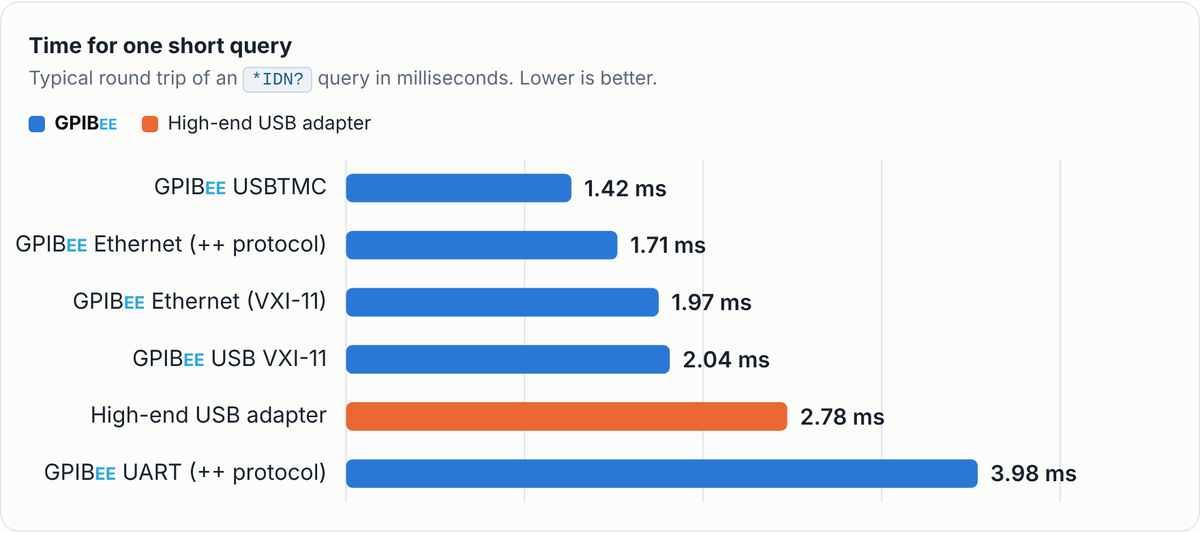
The first chart shows how long one complete *IDN? round trip takes: command out, answer back. Lower is better.
Time for one short query
Typical round trip of an *IDN? query in milliseconds. Lower is better.
Four of the five GPIBEE modes beat the high-end USB adapter. USBTMC needs 1.42 ms, about half of the 2.78 ms of the reference. Ethernet and USB VXI-11 land between 1.7 and 2.0 ms. The UART mode is the exception: a serial line cannot compete, and it is there for compatibility, not for speed.
Queries per second
How many query and answer pairs fit into one second, back to back. Higher is better.
Large transfers: everybody lands in the same range
Throughput still counts when you read a waveform or download a file from an instrument. We wrote a block to the instrument and read a binary file back, in sizes from 256 bytes to 1 MiB.
Writing to the instrument
Speed against size of one transfer. Small transfers are limited by the fixed cost per call, large ones by the link.
Reading from the instrument
A binary file is read back and checked byte by byte.
Both curves look alike: slow for tiny transfers, flat from about 16 KiB on. In the VXI-11, USB and USBTMC modes GPIBEE writes at about 400 to 415 kB/s and reads at 413 to 528 kB/s, and the high-end adapter is slightly ahead on big blocks. Its best read speed is 646 kB/s against 528 kB/s for GPIBEE USBTMC. Transfer speed also scales with the T1 time, the data settling time in the GPIB handshake. It was set to 500 ns on both adapters in these tests, GPIBEE and the high-end adapter alike, so the comparison is fair. Other T1 settings give other speeds. At these rates the GPIB handshake and the instrument itself usually set the ceiling, which is why the spread between adapters is small compared with the factor of two we saw in query speed.
One more latency number sits inside the read test. When a program fetches data in small pieces, every read call has a price. With the smallest buffer one call costs 172 µs on GPIBEE USBTMC and about 450 µs on Ethernet and USB VXI-11. The high-end adapter needs 1.45 ms per call. Programs that read in small chunks profit from that difference.
Why your numbers will differ. Maximum speeds in data sheets are typically measured against a logic-coupled dongle exercising the three-wire handshake with the minimum possible latency: a test fixture on the bus that answers without any processing on the instrument side. A real instrument is different. It parses the command, does its own work and then answers, so latency, queries per second and throughput all depend on the instrument as much as on the adapter. Our own results show it: the CMU200 above answers *IDN? in 1.4 to 4 ms, while the instrument in the stress test below needs about 14 ms for the same query, whatever adapter is used. Read every KPI in this article as "with this instrument", and measure with yours.
All numbers at a glance
We show all values, including the ones where GPIBEE is not the best. Green marks the best value in a row, orange the weakest, whoever it belongs to, with gradients in between. The best value is also bold. GPIBEE leads in query speed and in the cost per read call, the high-end adapter is ahead in large reads and writes.
| GPIBEE | High-end USB adapter | |||||
|---|---|---|---|---|---|---|
| USBTMC | USB VXI-11 | Ethernet VXI-11 | Ethernet ++Prologix compatible | UART ++Prologix compatible | ||
| Short query (ms) | 1.42 | 2.04 | 1.97 | 1.71 | 3.98 | 2.78 |
| Queries per second | 730 | 501 | 520 | 605 | 252 | 364 |
| Best write speed (kB/s) | 402 | 405 | 415 | 372 | 496 | 461 |
| Best read speed (kB/s) | 528 | 415 | 413 | 171 | 99 | 646 |
| Time per read call, smallest buffer | 172 µs | 472 µs | 447 µs | – | – | 1.45 ms |
The two ++ columns are the Prologix compatible protocol mode, where the adapter is addressed directly over a socket or a serial port instead of through a VISA library.
Looking at every single query
A typical value tells you little about how a setup behaves over a long run. So we ran a stress test, this time with a different instrument, not the Rohde & Schwarz CMU200 used above: three short queries, *IDN?, FREQ:CW? and SYST:ERR?, sent again and again. That makes 1.7 million rounds over GPIBEE USB, 0.95 million over GPIBEE Ethernet and 1.2 million with the high-end USB adapter, in total more than 11 million timed transfers. Every one of them went into a time bucket of 0.1 ms. The curves show what share of all queries landed in each bucket.
The three plots below are histograms. For now we leave out the extreme slow cases. More about those at the end.
Histogram: SYST:ERR? – read the error queue
Share of queries per 0.1 ms bucket. A curve further left is faster, a narrow curve is more consistent. Hover for values.
Histogram: FREQ:CW? – read the frequency setting
Same view for a query that returns a number.
All three adapters draw the same picture: a sharp peak and a short tail to the right.
- GPIBEE USB and the high-end adapter are almost identical. A
FREQ:CW?query takes about 3.0 ms on GPIBEE and 3.1 ms on the reference, aSYST:ERR?query about 2.9 ms on both. - GPIBEE Ethernet is the fastest in this test, with about 2.4 ms for
FREQ:CW?and 2.7 ms forSYST:ERR?. - Timing is consistent. Out of 100
FREQ:CW?queries, 99 are answered within about 5 ms on every adapter; forSYST:ERR?it is about 4 ms. - Ethernet has a longer tail. One in a thousand queries needs more than 9 ms there, against 5 to 7 ms on USB. That is what you expect when a network sits in the path: Ethernet latency also depends on network load. Just like ping times, which vary with the traffic on the network, GPIBEE query times over Ethernet are shorter on a quiet network and longer on a busy one. The Ethernet results here are therefore specific to our test network, and yours will depend on its load.
Why *IDN? takes so much longer
The third query behaves differently. Where the other two finish in about 3 ms, *IDN? needs almost 14 ms.
Histogram: *IDN? – ask for the identification
Note the different time axis: all curves sit around 14 ms.
The curves of all three adapters sit close together, with typical times within a third of a millisecond: about 13.7 ms on GPIBEE Ethernet, 13.8 ms on the high-end adapter and 14.0 ms on GPIBEE USB. Neither the interface nor the adapter changes it. The time is most likely spent in the instrument itself, which has to assemble and send its identification string. It depends on the instrument: the CMU200 in the first test answers *IDN? in 1.4 to 4 ms.
The practical consequence: do not use *IDN? as a quick "is the instrument still there" check inside a measurement loop. Ask once at startup, and use a cheaper query when you need to poll.
One more thing: a lesson for your timeouts
Every chart above has one thing in common. We left something out, and it is worth knowing about when you choose a timeout.
Here is the same data again as a histogram, one per adapter, this time with every measurement and no filter. Both scales are logarithmic: the time axis runs from 1 ms to over a second, and the count axis is stretched so that even a single query is visible.
Histogram of everything we measured
Each bar counts the queries in one time bucket, summed over the three query types. Hover for values.
Almost everything happens within the first few milliseconds, as the charts above showed. Then, far out at about one second, come five lonely queries. Five queries out of more than 11 million took more than 70 times longer than even a typical *IDN?, and several hundred times longer than the other two queries.
It is not a GPIBEE quirk, and it is not an adapter quirk at all. It is instrument behavior. The high-end USB adapter shows it just as well, and all five cases were *IDN? queries. The other two queries never came close to one second, not once in millions of transfers. The behavior belongs to the specific instrument we tested.
Our suspicion: to answer *IDN?, this instrument may ask several internal subsystem boards over slower interfaces. If one of them answers late, the instrument may run into an internal timeout and retry, or do something similar. That is only a guess; the real reason is unknown. What is certain is that it happened, on both adapters, for this instrument. So the lesson is about what a measured transfer time can and cannot tell you:
| Adapter | Query | Time for this one query |
|---|---|---|
| GPIBEE via USB | *IDN? | 1,030.8 ms |
| GPIBEE via Ethernet | *IDN? | 1,013.9 ms |
| GPIBEE via Ethernet | *IDN? | 1,030.5 ms |
| High-end USB adapter | *IDN? | 1,042.8 ms |
| High-end USB adapter | *IDN? | 1,043.0 ms |
Lesson: a typical time is not a worst case. A timeout of 10 ms looks generous next to a typical 3 ms, and 100 ms looks very safe. A timeout of one second, which many people pick as "plenty", would have fired five times in this test.
What to consider when you set timeouts:
- Never set a timeout close to a transfer time you have measured. A single measurement, or even millions of them, does not show the slowest case.
- Use seconds for ordinary queries, and add generous margin on top of the longest operation your instrument can legitimately do.
- Decide in your software what happens when a timeout hits anyway: retry the query, or log it and continue.
Instruments can have rare slow responses of their own that no adapter can remove, and other parts of the chain, such as the bus, driver and operating system, can add their own. Good software expects them.
Measured with the GPIBEE KPI tool. Query speed and throughput come from one run per setup against a Rohde & Schwarz CMU200; the timing histograms come from a separate long-running stress test with the three queries named above, measured with another instrument, not the CMU200. Slow-case times are rounded to the 0.1 ms bucket they fell into.