V1.7.2611152105 is on the Firmware Updates page. The change most people will meet first is how the update itself works.
Updating without the USB bootloader
Until now there was one way to get new firmware onto a GPIBEE: hold the button for five seconds, let it come up as a USB mass storage device, and copy the file across. That is fine at home. It stops being fine at work, because plenty of companies block USB mass storage by policy. If you sit at one of those PCs, the adapter on your bench was effectively not updatable at work.
V1.7 can update itself over the network. The Home page has a new button, Update firmware via web UI.
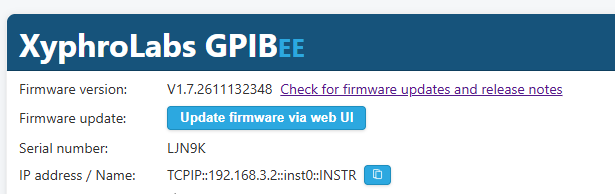
Pressing it asks for confirmation first, because the adapter restarts into update mode
and every connection and running measurement is cut at that moment. Do not start it in the
middle of a sweep. The update page then opens in the same browser window, you pick
GPIBee.GFW out of the unpacked download, and a progress bar runs while it
programs.
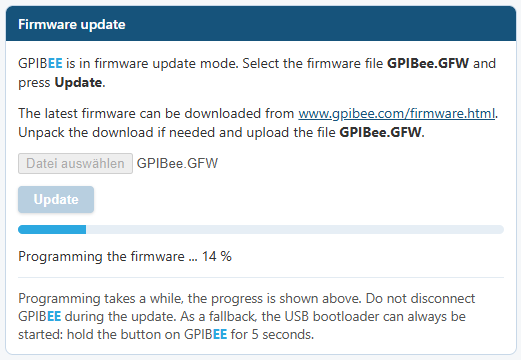
This works over Ethernet and over USB networking. The USB bootloader is not removed: hold the button for five seconds and it comes up exactly as before. It is also the recovery path if an update over the web interface ever fails, so a half written firmware does not leave you stranded.
There is no button that asks a server whether a newer version exists, and no option to install one automatically. That is on purpose, because GPIBEE never phones home. It opens no connection of its own to me or to anyone else, and it reports nothing about itself, not even a version number. The "Check for firmware updates and release notes" link next to the version on the Home page is an ordinary hyperlink, so your browser goes to gpibee.com and the adapter takes no part in it. An adapter on a bench with no route to the internet behaves exactly like one that has it.
A password for the web interface
The Settings page has a new panel, Web UI password protection. No password is set by default, so nothing changes until you set one.
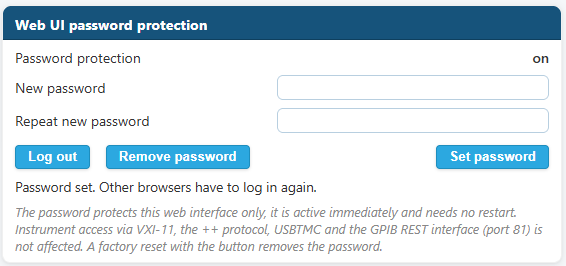
It covers the web interface and nothing else. VXI-11, the ++ protocol,
USBTMC and the GPIB REST interface on port 81 all carry on without a password, so turning
this on will not break a measurement script that was running yesterday. If you forget the
password, a factory reset with the button removes it.
Quieter on the network
An HTTP connection that has been idle for 45 seconds is now closed. I noticed that LAN agents from some of the major VISA vendors leave connections open after they are done with them. I am sure none of them means to, but on an adapter that runs for weeks those forgotten connections slowly use up memory and connection slots, so GPIBEE now clears them away itself.
This changes nothing about using the web interface. A browser opens a fresh connection whenever it needs one, so pages, the GPIB console and a bench you leave open all behave as they did. If you want to see who else is talking to the adapter, the Connections page lists them, and a FAQ entry covers the trouble a background scan can cause in the middle of a measurement.
Three more network changes:
- Packets lost on the way from a VISA client to the adapter were already recovered. The reply direction is now covered as well, so both directions ride out a network that drops the occasional packet.
- The adapter sends the DHCP vendor class
GPIBEEin option 60, so a DHCP server can put GPIBEE adapters into their own address range or hand them their own options. - The adapter no longer hands out VXI-11 link ID 0. Using 0 was VXI-11 compliant, and every VISA understands it. Older pyvisa-py releases, though, skip service request handling on a link whose ID is 0, so SRQ never reached the application (pyvisa-py issue 618). With link IDs other than 0, SRQ works with those releases too.
More of the ++ protocol
Eleven commands joined the ++ protocol:
++eorsets the read termination, the counterpart to++eosfor writes. It covers CR+LF, CR, LF, LF+CR, ETX, CR+LF+ETX and EOI, and the default stays "none", which reads until the timeout.++fndlscans the bus and gives back the addresses it finds, for example5,22,7:96.++spoll allserial polls every device on the bus in one go.++aspolldoes the same thing under a shorter name.++ppollruns a parallel poll and returns DIO1 to DIO8 as a number from 0 to 255, where a set bit means the device configured for that line wants service.++dclsends a universal Device Clear to every device, where the existing++clrclears only the addressed one.++rensets or reads the REN line. A released line is asserted again by the next bus operation.++unland++untsend UNListen and UNTalk to all devices.++idreads interface information: the LAN host name, the serial number or the firmware version.++defaultputs the++settings back to their defaults.
Much of this will look familiar if you have used an
AR488, the open source Arduino GPIB controller:
++default, ++eor, ++id and ++ren come
from its command set, so a good deal of what you wrote for an AR488 should run against
GPIBEE unchanged. Not every AR488 command is
covered. Its macros, ++repeat, and the listen-only and talk-only modes are not
implemented, and a serial poll of all devices is ++aspoll here where an AR488
writes ++allspoll. If one you rely on is missing, tell me and I will look at
adding it.
Parallel poll can also be configured from there, with
++ppollen <primary> [<secondary>] <dio> <sense> and
++ppolldis. Those two are a
GPIBEE extension and not part of the common
++ command set, so a script that uses them will not run on other GPIB
controllers.
Internal SCPI commands
Short mnemonics already worked for the ordinary cases, where the short form is simply
the first few letters, as in SYSTem to SYST. What did not work
were the mnemonics whose short form is spelled by capitals sitting further inside the word,
such as SendCoMmanD to SCMD. Those work now, so
SYST:COMM:GPIB:SCMD reaches the right command.
Numbers can also be given in hexadecimal with a 0x prefix, which is much
easier to read when you are sending raw GPIB command bytes:
SYST:COMM:GPIB:SCMD 0x3F,0x24,0x08
Smaller fixes
- A browser with JavaScript switched off gets a clear notice now, instead of a web interface that loads and then does nothing.
- Some instrument control GUIs show web pages in an embedded viewer that still runs on a very old Internet Explorer engine. Opening the web interface in one of those used to produce a script error dialog on every reload, and now gives a short notice instead.
- In Benches, value texts such as "Triangle" are no longer cut off at the bottom.
Getting it
Download it from the Firmware Updates page, and the manual and release notes for this build list every command in full. Coming from V1.6 you need the USB bootloader one last time, because the web update is the thing you are installing. From V1.7 onwards the next one can go on from the browser.