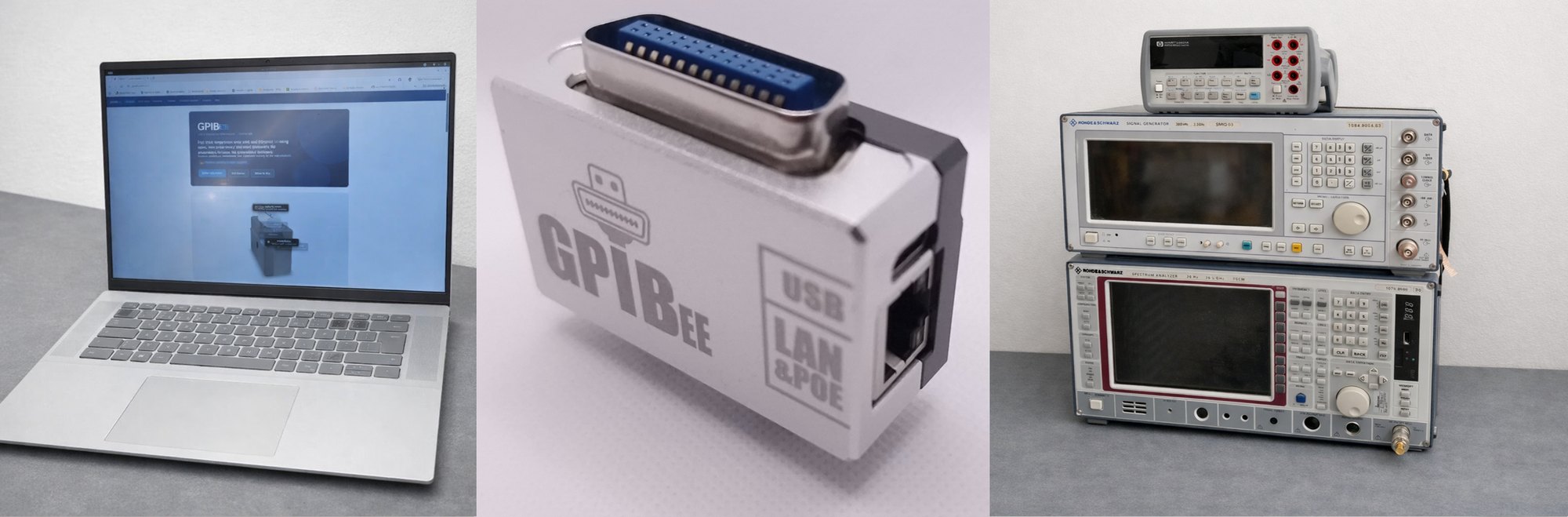
GPIBee is now sold in Japan by Tateno Dennou (立野電脳) in Tokyo, with a Japanese catalog and a launch price for academic and other customers. The quick start guide, the manual and a product overview are on this site in Japanese as well.
GPIBEE is developed by us, the makers of USBGPIB, an open-source USB-to-GPIB adapter that has been continuously maintained for over 7 years. That experience, including compatibility fixes won the hard way across generations of measurement instruments, went directly into GPIBEE's design. GPIBEE is a new development built on those lessons, adding Ethernet with Power over Ethernet, support for multiple simultaneous GPIB instruments, and higher transfer speeds, thanks to a high-speed interface, an efficient GPIB implementation and tristate-capable drivers instead of open-drain mode. GPIBEE speaks standard Test & Measurement protocols through standard VISA flows, so it works the way instruments and test software already expect.
PC / Mac / Linux · LabVIEW · MATLAB · Python · VISA · one or multiple PCs at once
480 Mbit USB · 100 Mbit Ethernet · PoE · GPIBee
Up to 15 GPIB instruments: oscilloscopes, multimeters, power supplies and many more · fast, low-latency control
Works with
PythonPyVISA
GNU OctaveGPIB Toolbox
Linux GPIB
Linux GPIBkernel driver
MATLAB
MATLABInstrument Control
LV
LabVIEWVXI-11 / VISA
NI
NI-VISAAuto-discovery
KS
Keysight IOIO Libraries Suite
R&S
R&S VISARsVisa
Almost any VISA-compatible software works; the list above covers the most common environments. Thanks to Linux GPIB, USBTMC and Prologix-compatible protocol modes, GPIBEE is also widely supported by non-VISA software.
MATLAB is a registered trademark of The MathWorks, Inc. LabVIEW and NI-VISA are trademarks of National Instruments. Keysight IO Libraries Suite is a trademark of Keysight Technologies. R&S VISA is a trademark of Rohde & Schwarz. Python is a trademark of the Python Software Foundation. All other trademarks are property of their respective owners.
Product Overview
GPIBEE is a compact, modern GPIB bridge that connects legacy IEEE-488 instruments to today's computers. GPIB goes by several names depending on the instrument's era and manufacturer. HPIB, GPIB, IEC-625 and IEEE-488 all refer to the same bus, and GPIBEE works with instruments labeled under any of them. It connects via USB-C (creating a private USB Ethernet interface) or via standard Ethernet, and exposes your instruments through the VXI-11 protocol that VISA-based software understands natively. Multiple simultaneous sessions are fully supported: several GPIB instruments can be controlled independently over the same bus, even from multiple PCs at the same time.
GPIB role:GPIBEE currently operates as a GPIB controller and VXI-11 bridge; GPIB device (instrument) emulation is not yet supported, it is on the roadmap for firmware version V1.7.
Supported interfaces & protocols
Interface
Mode
Protocol
USB
USB Network Mode
VXI-11 over USB-Ethernet (CDC NCM)
USBTMC Mode
USBTMC (USB Test & Measurement Class)
LinuxGPIB Mode
linux-gpib native interface
++ Protocol mode
Prologix- and AR488-compatible (++ commands) via CDC UART (virtual COM port)
Ethernet
Concurrent not mutually exclusive
VXI-11 over TCP/IP
Prologix- and AR488-compatible (++ commands)
VISA resource strings & setup examples:See the PyVISA tutorial and the User Manual for complete resource string examples and configuration details.
Electrical & physical
Power: USB-C (5 V, ≤ 500 mA) or 802.3af Power over Ethernet (PoE), so no additional supply is needed
GPIB connector: standard 24-pin IEEE-488
Ethernet: 10/100 Mbit RJ45, galvanically isolated, PoE included. VXI-11 and the Prologix-compatible ++ protocol
USB: USB-C, USB 2.0 High Speed (480 Mbit/s). USBTMC, Network (CDC NCM), UART (Prologix-compatible), Linux GPIB (USBTMC variant)
LEDs: green (Ethernet mode), orange (USB mode), both indicate data activity
Button: factory reset (5× press), firmware-update mode (5 s hold), or press once for fast web-interface access in USBTMC mode
What makes GPIBEE different
Advantages of GPIBEE
GPIBEE is designed for engineers and scientists who want reliable GPIB control without the complexity of legacy drivers or dedicated software.
✅
No Driver Headaches
WindowsmacOSLinux
Works over USB or Ethernet with no driver installation and no GPIB controller cards. Both USB network and standard Ethernet are natively supported by all modern operating systems.
Dual Connectivity
Use GPIBEE over USB High Speed (480 Mbit/s, private USB-Ethernet link) or over standard Ethernet. Plug in an Ethernet cable and it switches over by itself, with nothing to reconfigure.
🆕
Industry-Standard Protocols
VXI-11, USBTMC, and VISA are the same open standards used by every major instrument vendor. GPIBEE works with LabVIEW, MATLAB, Python/PyVISA and almost any VISA-based software, without proprietary drivers or extra software.
🧬
Not a Protocol Clone
Some cloned USB-to-GPIB adapters mimic other manufacturer's proprietary protocol without authorization. Since that protocol is not public, the vendors can lock those devices out at any time, and compatibility is already inconsistent on every operating system. GPIBEE instead speaks VXI-11, an open protocol built for GPIB and understood by VISA directly, which makes compatibility predictable.
📊
Built-in Web Interface
A full browser-based console lets you send GPIB commands, monitor status, and change settings without installing anything. It works on a desktop and on a phone.
⚡
Multiple Protocols
Supports VXI-11 over Ethernet and USB, Prologix-compatible ASCII protocol over TCP/IP and USB UART, USBTMC and Linux GPIB, which covers almost every test-automation framework.
🔎
Auto-Discovery
LXI, VXI-11 discovery, mDNS (Bonjour/Avahi), and SSDP broadcast let VISA resource managers find GPIBEE automatically on the network, with no IP address to type in.
🔌
Flexible Power Options
Power via USB-C or 802.3af Power over Ethernet (PoE), so no dedicated power cable is needed. The Ethernet port is galvanically isolated, PoE included, which protects your instruments and host PC.
🔒
Private USB Network
In USB mode, GPIBEE creates its own isolated DHCP-served network. Your instrument traffic stays private and never touches your corporate LAN. VXI-11 runs over this USB connection too, so you still get multiple simultaneous GPIB instruments and concurrent access from more than one application, the same as over Ethernet.
🔧
Field-Updatable Firmware
From V1.7 on, update straight from the built-in web interface over Ethernet or USB, with a progress bar. Or hold the button and GPIBEE appears as a virtual USB drive you copy the firmware file onto. No special tools, no DFU utilities, and device settings are preserved across updates.
Developed & Made in Germany
Every GPIBEE unit is developed, assembled, and tested in Germany. Firmware and software are actively maintained by the same team that built the hardware. Technical support comes directly from the manufacturer, with no reseller in between.
See it in action
Watch the GPIBee Intro
A walkthrough of GPIBEE's USB & Ethernet connectivity and VISA integration
New in firmware V1.6
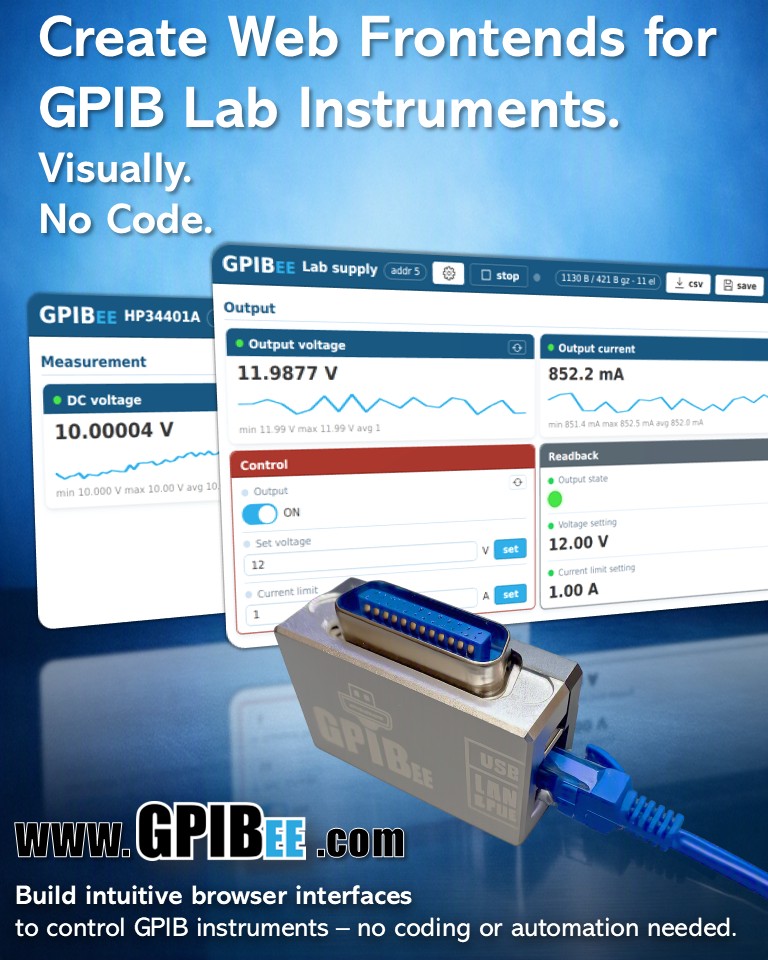
GPIBEE Benches: give any instrument a web interface
Click together a browser front panel for any instrument on the bus: readouts, switches, selectors and buttons, without writing a line of software. The panel is stored on the GPIBEE itself, so it is there from any browser on the network. Laptop, phone or tablet, nothing installed.
You fill in fields, not code. Every element is a label, a style and the GPIB command behind it. A test button shows the raw reply, its bytes in hex, and the value the card will display.
Live readings with a trend line. Rolling minimum, maximum and average, plus a CSV download of everything the bench has read.
Real controls. Switches, selectors, entry fields and buttons: flip a supply's output from another room, change a range, trigger a self-test.
Buttons that download files. Scope screenshots, captured waveforms, saved setups and internal logs land straight in your download folder.
Several benches, stored side by side. One GPIBEE holds a front panel for every instrument on your bus, and you pick the one you want from a dropdown. Only the selected bench runs, so nothing polls the bus behind your back.
Benches travel. Download one as a small .gpibee file and send it to somebody with the same instrument.
How GPIBEE compares to the previous generation UsbGPIB V2 adapter, also developed by us. Explore the open-source project on GitHub.
Feature
GPIBEE
UsbGPIB V2
PC-Side Interface
USB Connector
USB-C
USB-C
USB Speed
High Speed (480 Mbit/s)
Full Speed (12 Mbit/s)
Ethernet Port
✔ Built-in RJ45 with PoE support
✘ Not available
Driver Required
✔ no proprietary driver
✔ no proprietary driver
Operating systems
✔ Linux / macOS / Windows
✔ Linux / macOS / Windows
Private USB Network (isolation)
✔
✘
Protocols / Configuration
Standard Protocols open, non-proprietary
VXI-11 (USB & Ethernet), USBTMC
USBTMC
Proprietary Protocol
✔ ++ protocol (Prologix compatible)
✘
Configuration Interface
✔ Web interface + internal SCPI commands
Internal SCPI commands only
GPIB Console via Web Interface send/receive GPIB commands live, in any browser
✔
✘ No web interface
No-Code Instrument Front Panels build your own browser control panel per instrument, no software and no scripting
✔GPIBEE Benches, stored on the adapter
✘ No web interface
GPIB Features
Multiple GPIB Devices with one controller
✔ Best via VXI-11
⚠ Special command required. Possible, but not easy to use and not well scaleable
Concurrent GPIB Device Access
✔ Fully supported via VXI-11, also from multiple PCs simultaneously
✘
Service Request (SRQ)
✔
✔
Primary Address Range
0 – 30
⚠ 1 – 30
Secondary Address Range
✔ 0 – 30
⚠ 0-7
Adjustable Controller Address
✔ 0 – 30
✘ Fixed at address 0, only adjustable when using LinuxGPIB
T1 Delay Time
Adjustable: 350ns – 2000ns
Fixed
Serial Poll
✔
✔
Parallel Poll Older concept, still required by some instruments
✔
✘
Configuration & Discovery
Auto-Discovery LXI / VXI-11 / mDNS / SSDP
✔
✘
Looking for real-world KPI data?
We measured latency and throughput for every GPIBEE interface mode against a popular high-end USB adapter, and logged more than 11 million timed transfers. All numbers are published, including the ones we do not win.
1.42 ms per query2× the queries per second11 million transfers logged
 Developed, assembled & tested in Germany